Gang scheduling#
Note
Gang scheduling is an alpha feature. The API may change in future releases.
Gang scheduling enables you to co-schedule groups of deployment replicas atomically. A gang is a set of replicas that are reserved and started together using a single Ray placement group. If the cluster doesn’t have enough resources for the entire gang, none of the replicas in that gang are started.
This is useful for workloads where a partial set of replicas is useless, such as:
Data parallel attention deployment: In WideEP deployments, data parallel attention - expert parallelism ranks are required coordinate with each other to perform dispatch-combine collective communication. Any rank failure leads to dispatch-combine collective hangs, and the entire data parallel attention - expert parallelism group needs to go through failover mechanism to re-establish collectives.
Any workload requiring coordinated startup, where replicas need to discover each other’s identities and establish communication before serving traffic.
Getting started#
Configure gang scheduling by passing a GangSchedulingConfig to the @serve.deployment decorator:
from ray import serve
from ray.serve.config import GangSchedulingConfig


@serve.deployment(
    num_replicas=8,
    ray_actor_options={"num_cpus": 0.25},
    gang_scheduling_config=GangSchedulingConfig(gang_size=4),
)
class Gang:
    def __call__(self, request):
        return "Hello!"


app = Gang.bind()
This creates 2 gangs of 4 replicas each resulting in a total of 8 replicas. Partial gang isn’t allowed, and therefore num_replicas must be a multiple of gang_size.
How resources are reserved within a gang#
The ray_actor_options field defines the resource requirements for each replica actor (for example, CPU, GPU, memory). When gang scheduling is enabled without placement_group_bundles, Ray uses the resources from ray_actor_options as the bundle template for each replica’s slot in the gang placement group. For example, with ray_actor_options={"num_cpus": 0.25} and gang_size=4, the gang placement group contains 4 bundles of {"CPU": 0.25} each.
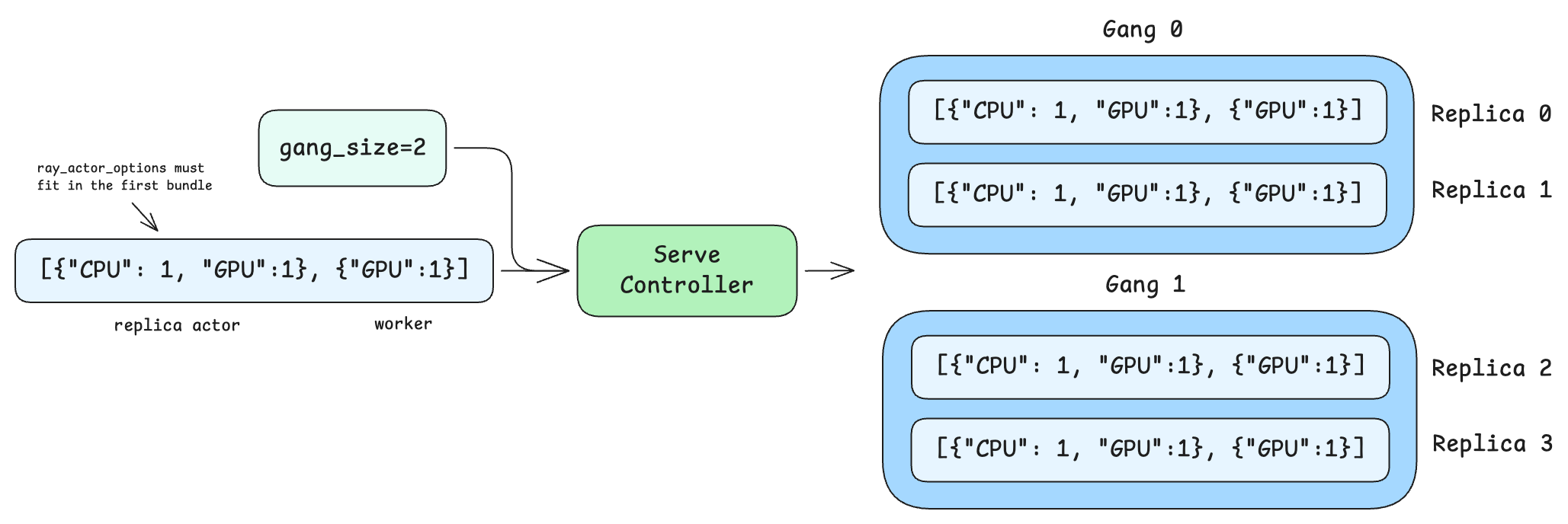
When placement_group_bundles is also set, each replica occupies multiple consecutive bundles in the gang placement group instead of a single flat bundle. The replica actor runs in the first bundle, so the resources in ray_actor_options must fit within that first bundle. The remaining bundles are available for child actors or tasks spawned by the replica. See Combining with placement group bundles for details.
You can also configure gang scheduling via .options():
@serve.deployment
class BaseGang:
    def __call__(self, request):
        return "Hello!"


app_with_gang = BaseGang.options(
    num_replicas=8,
    ray_actor_options={"num_cpus": 0.25},
    gang_scheduling_config=GangSchedulingConfig(gang_size=4),
).bind()
In production deployments, declarative YAML config files are often used:
applications:
- name: my_app
  route_prefix: /
  import_path: my_module:app
  deployments:
  - name: MyModel
    num_replicas: 8
    ray_actor_options:
      num_cpus: 0.25
    gang_scheduling_config:
      gang_size: 4
Accessing gang context#
Each replica in a gang has access to a GangContext through the replica context. This provides the information replicas need to discover each other and coordinate:
@serve.deployment(
    num_replicas=4,
    ray_actor_options={"num_cpus": 0.25},
    gang_scheduling_config=GangSchedulingConfig(gang_size=2),
)
class GangWithContext:
    def __init__(self):
        ctx = serve.get_replica_context()
        gc = ctx.gang_context
        self.rank = gc.rank
        self.world_size = gc.world_size
        self.gang_id = gc.gang_id
        self.member_ids = gc.member_replica_ids

    def __call__(self, request):
        return {
            "gang_id": self.gang_id,
            "rank": self.rank,
            "world_size": self.world_size,
        }


gang_context_app = GangWithContext.bind()
For the full interface, see GangContext.
Replicas can use rank and world_size to set up distributed communication, e.g. initializing NCCL process groups, and member_replica_ids to discover and connect to their peers.
Placement group strategies#
Gang scheduling supports two placement group strategies that control how replicas within a gang are distributed across nodes:
PACK (default)#
Packs all replicas in a gang onto as few nodes as possible. This is best for workloads that benefit from locality, such as data parallel ranks within data parallel attention - expert parallelism deployment for MoE LLMs.
Although PACK colocates as many replicas per node as possible, it does not guarantee that ranks are contiguous within a node. For example, a gang of 8 replicas split across 2 nodes may be assigned ranks {0, 3, 5, 7} on one node and {1, 2, 4, 6} on the other, rather than {0, 1, 2, 3} and {4, 5, 6, 7}. Applications should not assume that consecutive ranks share a node. This is particularly important when a single replica owns multiple bundles, such as a tensor-parallel group. In that case, the bundles belonging to one replica may land on different nodes, splitting collective communication across the network. To ensure that the bundles for a single replica land on the same node, sort the gang placement group’s bundle indices by node IP and assign each replica a contiguous slice of the sorted order.
from ray import serve
from ray.serve.config import GangPlacementStrategy, GangSchedulingConfig


@serve.deployment(
    num_replicas=4,
    ray_actor_options={"num_cpus": 0.25},
    gang_scheduling_config=GangSchedulingConfig(
        gang_size=4,
        gang_placement_strategy=GangPlacementStrategy.PACK,
    ),
)
class PackedGang:
    def __call__(self, request):
        return "Packed on same node"


packed_app = PackedGang.bind()
SPREAD#
Spreads replicas in a gang across as many distinct nodes as possible. This is useful for fault isolation, where you want to minimize the impact of a single node failure.
@serve.deployment(
    num_replicas=4,
    ray_actor_options={"num_cpus": 0.25},
    gang_scheduling_config=GangSchedulingConfig(
        gang_size=2,
        gang_placement_strategy=GangPlacementStrategy.SPREAD,
    ),
)
class SpreadGang:
    def __call__(self, request):
        return "Spread across nodes"


spread_app = SpreadGang.bind()
Both strategies are best effort. PACK tries to colocate but may spread across nodes if a single node lacks capacity. SPREAD tries to distribute but may colocate if there aren’t enough nodes.
Combining with placement group bundles#
You can combine gang scheduling with placement_group_bundles to reserve additional resources per replica within the gang. When both are set, the gang placement group contains the flattened bundles for all replicas in the gang. Each replica occupies len(placement_group_bundles) consecutive bundles, with the replica actor running in the first bundle.
@serve.deployment(
    num_replicas=4,
    ray_actor_options={"num_cpus": 0},
    placement_group_bundles=[{"CPU": 1, "GPU": 1}],
    gang_scheduling_config=GangSchedulingConfig(gang_size=2),
)
class GangWithSingleBundleReplica:
    def __call__(self, request):
        return "Running on reserved GPUs"


gang_single_bundle_replica_app = GangWithSingleBundleReplica.bind()
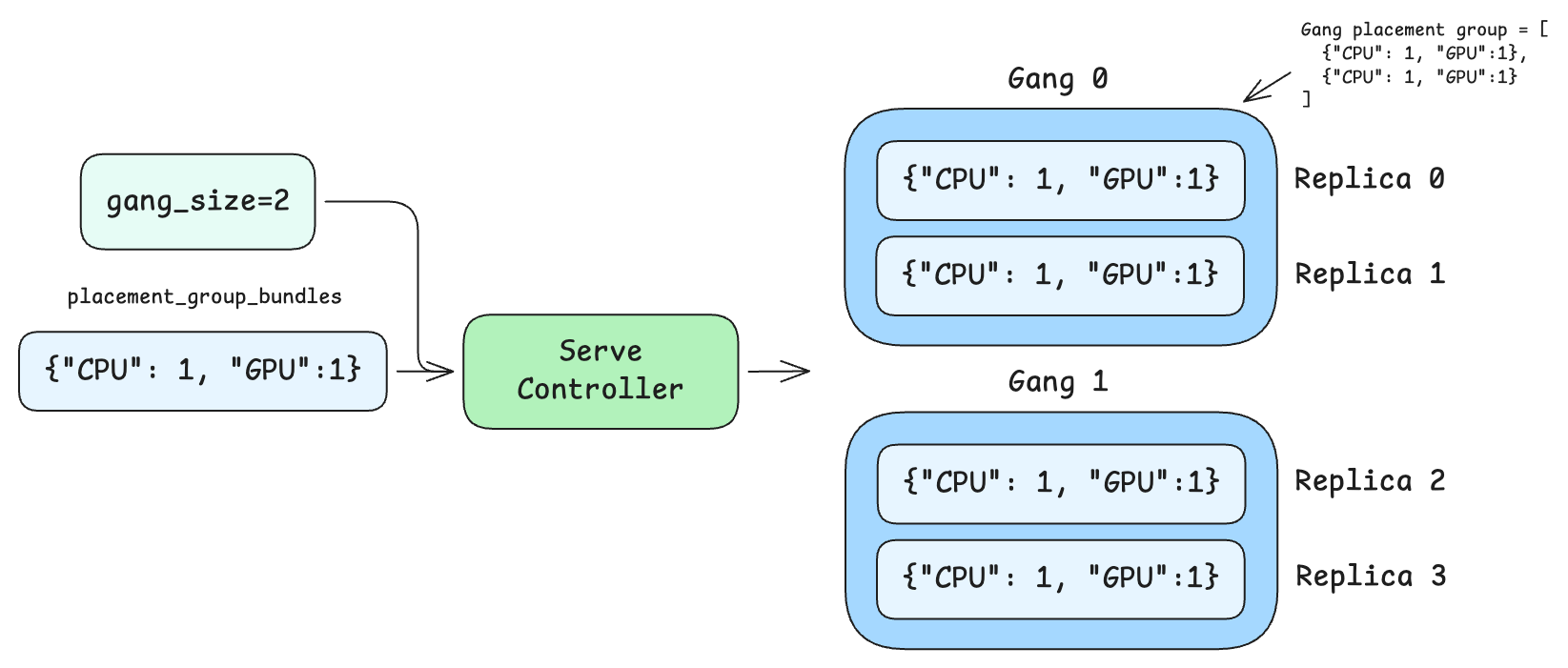
In this example, each gang of 2 replicas creates a single gang placement group with 2 bundles (one {"CPU": 1, "GPU": 1} bundle per replica) upon scheduling. Note that ray_actor_options={"num_cpus": 0} is set so the replica actor doesn’t request resources outside the placement group — all resource reservation is handled through the bundles.
If each replica needed multiple bundles, for example, one for the replica actor and one for a worker, the gang PG would contain gang_size * len(placement_group_bundles) total bundles. Replica 0 would occupy bundle indices 0 and 1, while replica 1 would occupy indices 2 and 3.
@serve.deployment(
    num_replicas=4,
    ray_actor_options={"num_cpus": 1},
    placement_group_bundles=[{"CPU": 1, "GPU": 1}, {"GPU": 1}],
    gang_scheduling_config=GangSchedulingConfig(gang_size=2),
)
class GangWithMultiBundlesReplica:
    def __call__(self, request):
        return "Running on reserved GPUs"


gang_multi_bundles_replica_app = GangWithMultiBundlesReplica.bind()
You can also use placement_group_bundle_label_selector to control which nodes the gang’s bundles are placed on. The per-replica label selector is replicated across all replicas in the gang, so every replica is steered to nodes matching the selector. For example, to schedule all gang members on nodes with A100 GPUs:
@serve.deployment(
    num_replicas=4,
    ray_actor_options={"num_cpus": 0},
    placement_group_bundles=[{"CPU": 1, "GPU": 1}],
    placement_group_bundle_label_selector=[{"ray.io/accelerator-type": "A100"}],
    gang_scheduling_config=GangSchedulingConfig(gang_size=2),
)
class GangOnA100:
    def __call__(self, request):
        return "Running on A100"


gang_a100_app = GangOnA100.bind()
Autoscaling#
Gang scheduling works with Ray Serve autoscaling (num_replicas="auto"). When autoscaling is enabled, the replica count recommended by the base autoscaling policy is always rounded up to the next multiple of gang_size, so the deployment never operates below the capacity the base policy requested.
@serve.deployment(
    autoscaling_config={
        "min_replicas": 4,
        "max_replicas": 16,
        "initial_replicas": 8,
        "target_ongoing_requests": 5,
    },
    ray_actor_options={"num_cpus": 0.25},
    gang_scheduling_config=GangSchedulingConfig(gang_size=4),
)
class AutoscaledGang:
    def __call__(self, request):
        return "Hello!"


autoscaled_app = AutoscaledGang.bind()
When using autoscaling with gang scheduling, min_replicas, max_replicas, and initial_replicas must all be multiples of gang_size.
Scale-to-zero is supported: set min_replicas=0. The deployment scales up and down in complete gangs.
In Ray Serve autoscaler, gang quantization is handled automatically by a GangSchedulingAutoscalingPolicy wrapper that is injected around the base autoscaling policy.
Example: With gang_size=4, if the base autoscaling policy recommends 5 replicas, the GangSchedulingAutoscalingPolicy rounds up to 8. If the policy recommends 10 replicas, the gang-aware policy rounds up to 12. Always rounding up makes the output deterministic: the same desired count produces the same replica target regardless of the current replica count, which prevents oscillation between two gang-aligned values.
Fault tolerance#
RESTART_GANG policy#
The runtime_failure_policy controls what happens when a replica in a running gang fails a health check. The default policy is RESTART_GANG:
from ray import serve
from ray.serve.config import GangRuntimeFailurePolicy, GangSchedulingConfig


@serve.deployment(
    num_replicas=8,
    ray_actor_options={"num_cpus": 0.25},
    gang_scheduling_config=GangSchedulingConfig(
        gang_size=4,
        runtime_failure_policy=GangRuntimeFailurePolicy.RESTART_GANG,
    ),
)
class FaultTolerantGang:
    def __call__(self, request):
        return "Hello!"


fault_tolerant_app = FaultTolerantGang.bind()
When any replica in a gang fails its health check, all replicas in that gang are torn down and a fresh gang is created. This ensures gang members always start together and can re-establish coordinated state (for example, NCCL communicators).
Note
RESTART_REPLICA (restarting only the failed replica while keeping healthy gang members running) is not yet supported. If you need this behavior, file a GitHub issue.
Incomplete gang detection#
If a gang member dies while the Serve controller is down, the controller detects the incomplete gang on recovery. It checks each running replica’s gang_context.member_replica_ids against the set of tracked replicas. If any member is missing, the entire gang is restarted.
Controller recovery#
Gang scheduling state survives controller restarts: GangContext is persisted in replica metadata and restored when the controller reconnects to existing replicas.
How gang scheduling works#
This section describes the internal mechanics for users who want to understand the system in depth.
Placement group lifecycle#
Reservation: During each reconciliation loop, the Serve controller’s deployment scheduler creates named placement groups for each gang. The bundles in the placement group are constructed by repeating the per-replica resource requirements
gang_sizetimes, or flatteningplacement_group_bundlesacross all replicas in the gang.Atomic startup: Once a gang placement group is ready, all replicas in the gang are scheduled together. Each replica is assigned a
rank(0 togang_size - 1) and receives aGangContext. Replicas are scheduled into specific bundle indices within the gang placement group.Cleanup: When a deployment is deleted or a gang is replaced, its placement group is removed. The controller also runs periodic leak detection to clean up orphaned gang placement groups.
Scaling#
Upscaling: The controller reserves gang placement groups, then starts all replicas in each gang together once the placement group is ready. Gangs that can’t be scheduled due to insufficient resources are retried on subsequent reconciliation loops while successfully scheduled gangs proceed. If any replica fails during startup, the entire gang is stopped and retried.
Downscaling: The controller selects complete gangs for removal rather than individual replicas, ensuring no gang is left partially running.
Rolling updates#
When a deployment config or code changes, the rolling update process replaces complete gangs atomically. The rollout size is aligned to gang_size multiples, so each update wave stops and starts whole gangs.
Migration#
When replicas need to migrate due to node draining, entire gangs are migrated atomically rather than individual replicas, preserving the atomic scheduling guarantees.
Constraints and limitations#
max_replicas_per_nodecannot be used together with gang scheduling since gang scheduling uses placement groups.