KV cache offloading#
Extend KV cache capacity by offloading to CPU memory or local disk for larger batch sizes and reduced GPU memory pressure.
Note
KV cache offloading is a vLLM feature. Ray Serve LLM builds on it by optionally enabling KV-aware routing across GPU and offloaded KV cache tiers. This guide covers vLLM’s native CPU backend, the LMCache integration, and composing multiple backends with MultiConnector.
Benefits of KV cache offloading:
Increased capacity: Store more KV caches by using CPU RAM or local storage instead of relying solely on GPU memory.
Cache reuse across requests: Save and reuse previously computed KV caches for repeated or similar prompts, reducing prefill computation and improving TTFT.
Flexible storage backends: Choose from multiple storage options including local CPU, disk, or distributed systems.
KV cache offloading matters most when there is GPU memory pressure:
Long-running services: Multi-turn conversations and agent sessions can resume after a pause. By then, their KV cache may have been evicted from GPU memory, forcing the engine to recompute the full prefill. A CPU or external cache tier preserves this history across longer gaps.
Long-context workloads at high concurrency: A small number of long prompts can quickly consume the GPU KV cache, causing shared prefixes to be evicted before subsequent requests have a chance to reuse them.
Choose a backend#
All three backends extend KV cache capacity, but their integration with Ray Serve LLM differs:
Backend |
Configure with |
KV-aware routing sees the offloaded tier |
Grafana KV Offload panels |
|---|---|---|---|
Native CPU |
|
Yes |
All |
LMCache |
|
No |
Hit-rate panels only |
MultiConnector |
|
No |
Hit-rate panels only |
KVAwareRouter indexes the GPU KV cache events that Ray Serve LLM enables on every KV-aware deployment. Tracking blocks in the offloaded tier additionally needs CPU-tier events, which Ray Serve LLM enables only for the native backend. With LMCache or MultiConnector the router still routes, but scores an offloaded prefix as though it weren’t cached.
Offload to CPU memory with native vLLM offloading#
vLLM’s native backend moves evicted KV blocks to CPU memory instead of discarding them, then reloads them on a later cache hit.
Enable it with two engine_kwargs:
kv_offloading_size: CPU KV cache capacity per replica, in GiB. With tensor parallelism, this is the total across all TP ranks. Offloading is disabled unless you set this value.kv_offloading_backend: Set to"native"for vLLM’s built-in CPU offloading. Setting it to"lmcache"usesLMCacheMPConnectorinstead, where LMCache manages the capacity. See Deploy with LMCache for direct LMCache configuration.
Native offloading builds on Automatic Prefix Caching, so keep enable_prefix_caching set to True. For the full set of connector options, including multi-tier configurations that extend beyond CPU memory to disk or object storage, see the vLLM KV offloading usage guide.
from ray import serve
from ray.serve.llm import LLMConfig, build_openai_app

llm_config = LLMConfig(
    model_loading_config={
        "model_id": "qwen3-0.6b",
        "model_source": "Qwen/Qwen3-0.6B",
    },
    deployment_config={
        "autoscaling_config": {"min_replicas": 2, "max_replicas": 2},
    },
    engine_kwargs={
        "enable_prefix_caching": True,
        "kv_offloading_backend": "native",
        "kv_offloading_size": 8,  # GiB of CPU KV cache per replica
    },
)

app = build_openai_app({"llm_configs": [llm_config]})
serve.run(app)
applications:
  - name: llm-with-native-offload
    route_prefix: /
    import_path: ray.serve.llm:build_openai_app
    args:
      llm_configs:
        - model_loading_config:
            model_id: qwen3-0.6b
            model_source: Qwen/Qwen3-0.6B
          deployment_config:
            autoscaling_config:
              min_replicas: 2
              max_replicas: 2
          engine_kwargs:
            enable_prefix_caching: true
            kv_offloading_backend: native
            kv_offloading_size: 8  # GiB of CPU KV cache per replica
Deploy with:
serve run config.yaml
Combine offloading with a request router#
KV cache offloading benefits any routing policy. When a request reaches a replica, the replica can reload a matching prefix from its CPU cache instead of recomputing the prefill. Routers that already tend to send related requests to the same replica can therefore benefit from a larger effective KV cache.
KVAwareRouter incorporates the offloaded KV cache directly into its routing decisions. It tracks which prefixes each replica holds in CPU memory and assigns them less cache credit than GPU-resident prefixes to account for the cost of transferring them back to the GPU. Other routers make routing decisions without visibility into KV blocks that have been offloaded from GPU memory.
For router configuration, see KV-aware routing and Request routing.
Monitor offloading and reloading#
The Serve LLM Grafana dashboard includes a KV Cache Offload / Reload row, collapsed by default.
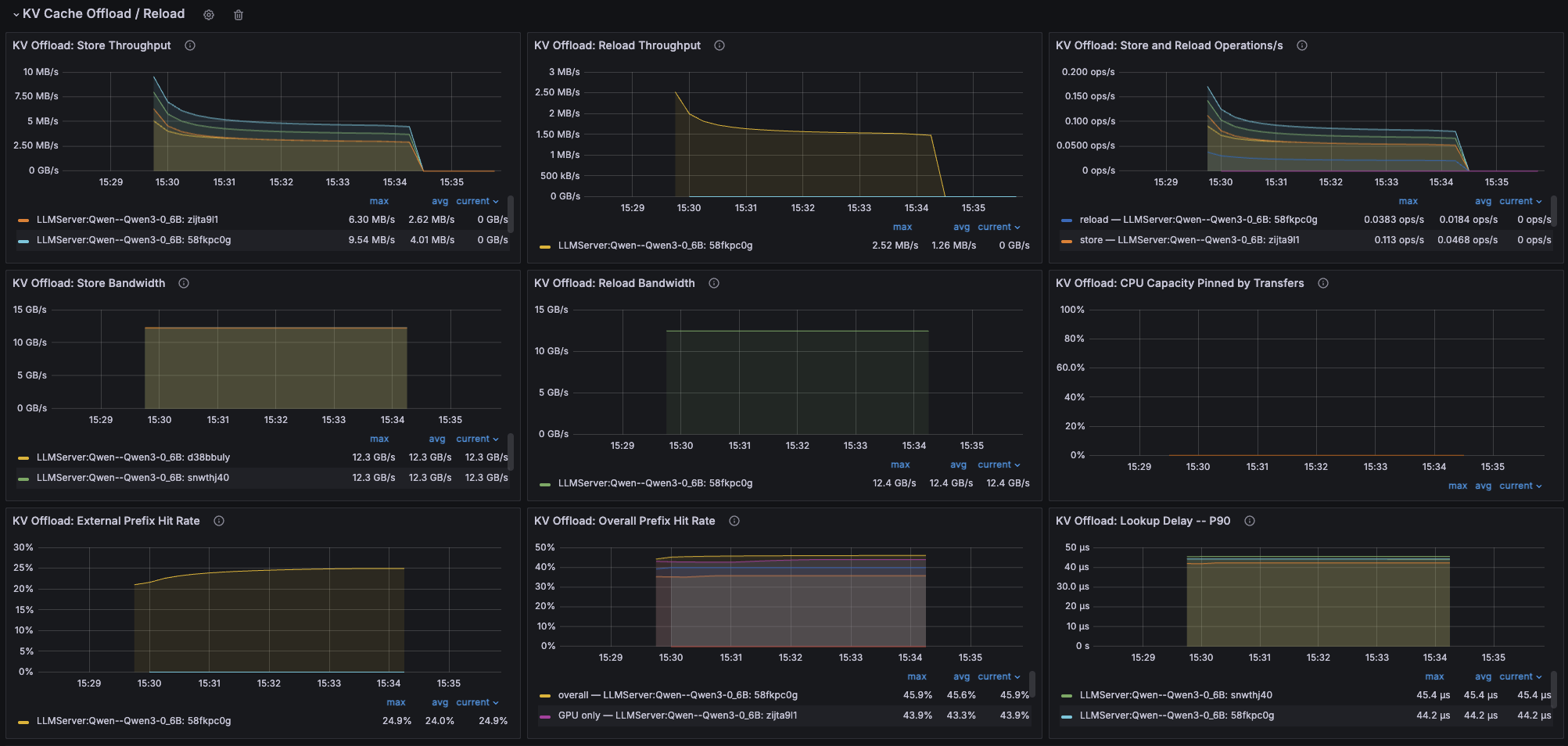
The KV Cache Offload / Reload row expanded. Every panel breaks down by LLMServer replica.#
Panel |
Metric |
What to look for |
|---|---|---|
Store / Reload Throughput |
|
GPU-to-CPU and CPU-to-GPU data rates. Store traffic without reloads suggests offloaded blocks aren’t being reused. |
Store and Reload Operations/s |
|
Transfer operations per second. Compare this with throughput to identify workloads dominated by many small transfers. |
Store / Reload Bandwidth |
Bytes over transfer time |
Effective transfer bandwidth between GPU and CPU memory. Helps distinguish low transfer volume from slow transfers. |
CPU Capacity Pinned by Transfers |
|
CPU cache capacity occupied by in-flight transfers. Sustained usage near 100% can cause transfers to be dropped; consider increasing |
External Prefix Hit Rate |
|
Percentage of prefix lookups served from the offloaded cache tier. |
Overall Prefix Hit Rate |
GPU and external hits over |
Combined prefix cache hit rate across GPU and external tiers. |
Lookup Delay P90 |
|
P90 latency added by cache lookup before prefill. |
Deploy with LMCache#
LMCache provides KV cache offloading with support for multiple storage backends.
Prerequisites#
Install LMCache:
uv pip install lmcache
Basic deployment#
The following example shows how to deploy with LMCache for local CPU offloading:
from ray.serve.llm import LLMConfig, build_openai_app
import ray.serve as serve

llm_config = LLMConfig(
    model_loading_config={
        "model_id": "qwen-0.5b",
        "model_source": "Qwen/Qwen2-0.5B-Instruct"
    },
    engine_kwargs={
        "tensor_parallel_size": 1,
        "kv_transfer_config": {
            "kv_connector": "LMCacheConnectorV1",
            "kv_role": "kv_both",
        }
    },
    runtime_env={
        "env_vars": {
            "LMCACHE_LOCAL_CPU": "True",
            "LMCACHE_CHUNK_SIZE": "256",
            "LMCACHE_MAX_LOCAL_CPU_SIZE": "100",  # 100GB
        }
    }
)

app = build_openai_app({"llm_configs": [llm_config]})
serve.run(app)
applications:
  - name: llm-with-lmcache
    route_prefix: /
    import_path: ray.serve.llm:build_openai_app
    runtime_env:
      env_vars:
        LMCACHE_LOCAL_CPU: "True"
        LMCACHE_CHUNK_SIZE: "256"
        LMCACHE_MAX_LOCAL_CPU_SIZE: "100"
    args:
      llm_configs:
        - model_loading_config:
            model_id: qwen-0.5b
            model_source: Qwen/Qwen2-0.5B-Instruct
          engine_kwargs:
            tensor_parallel_size: 1
            kv_transfer_config:
              kv_connector: LMCacheConnectorV1
              kv_role: kv_both
Deploy with:
serve run config.yaml
Compose multiple KV transfer backends with MultiConnector#
You can combine multiple KV transfer backends using MultiConnector. This is useful when you want both local offloading and cross-instance transfer in disaggregated deployments.
When to use MultiConnector#
Use MultiConnector to combine multiple backends when you’re using prefill/decode disaggregation and want both cross-instance transfer (NIXL) and local offloading.
The following example shows how to combine NIXL (for cross-instance transfer) with LMCache (for local offloading) in a prefill/decode deployment:
Note
The order of connectors matters. Since you want to prioritize local KV cache lookup through LMCache, it appears first in the list before the NIXL connector.
from ray.serve.llm import LLMConfig, build_pd_openai_app
import ray.serve as serve

# Shared KV transfer config combining NIXL and LMCache
kv_config = {
    "kv_connector": "MultiConnector",
    "kv_role": "kv_both",
    "kv_connector_extra_config": {
        "connectors": [
            {
                "kv_connector": "LMCacheConnectorV1",
                "kv_role": "kv_both",
            },
            {
                "kv_connector": "NixlConnector",
                "kv_role": "kv_both",
                "backends": ["UCX"],
            }
        ]
    }
}

prefill_config = LLMConfig(
    model_loading_config={
        "model_id": "qwen-0.5b",
        "model_source": "Qwen/Qwen2-0.5B-Instruct"
    },
    engine_kwargs={
        "tensor_parallel_size": 1,
        "kv_transfer_config": kv_config,
    },
    runtime_env={
        "env_vars": {
            "LMCACHE_LOCAL_CPU": "True",
            "LMCACHE_CHUNK_SIZE": "256",
            "UCX_TLS": "all",
        }
    }
)

decode_config = LLMConfig(
    model_loading_config={
        "model_id": "qwen-0.5b",
        "model_source": "Qwen/Qwen2-0.5B-Instruct"
    },
    engine_kwargs={
        "tensor_parallel_size": 1,
        "kv_transfer_config": kv_config,
    },
    runtime_env={
        "env_vars": {
            "LMCACHE_LOCAL_CPU": "True",
            "LMCACHE_CHUNK_SIZE": "256",
            "UCX_TLS": "all",
        }
    }
)

pd_config = {
    "prefill_config": prefill_config,
    "decode_config": decode_config,
}

app = build_pd_openai_app(pd_config)
serve.run(app)
applications:
  - name: pd-multiconnector
    route_prefix: /
    import_path: ray.serve.llm:build_pd_openai_app
    runtime_env:
      env_vars:
        LMCACHE_LOCAL_CPU: "True"
        LMCACHE_CHUNK_SIZE: "256"
        UCX_TLS: "all"
    args:
      prefill_config:
        model_loading_config:
          model_id: qwen-0.5b
          model_source: Qwen/Qwen2-0.5B-Instruct
        engine_kwargs:
          tensor_parallel_size: 1
          kv_transfer_config:
            kv_connector: MultiConnector
            kv_role: kv_both
            kv_connector_extra_config:
              connectors:
                - kv_connector: LMCacheConnectorV1
                  kv_role: kv_both
                - kv_connector: NixlConnector
                  kv_role: kv_both
                  backends: ["UCX"]
      decode_config:
        model_loading_config:
          model_id: qwen-0.5b
          model_source: Qwen/Qwen2-0.5B-Instruct
        engine_kwargs:
          tensor_parallel_size: 1
          kv_transfer_config:
            kv_connector: MultiConnector
            kv_role: kv_both
            kv_connector_extra_config:
              connectors:
                - kv_connector: LMCacheConnectorV1
                  kv_role: kv_both
                - kv_connector: NixlConnector
                  kv_role: kv_both
                  backends: ["UCX"]
Deploy with:
serve run config.yaml
Configuration parameters#
LMCache environment variables#
LMCACHE_LOCAL_CPU: Set to"True"to enable local CPU offloadingLMCACHE_CHUNK_SIZE: Size of KV cache chunks, in terms of tokens (default: 256)LMCACHE_MAX_LOCAL_CPU_SIZE: Maximum CPU storage size in GBLMCACHE_PD_BUFFER_DEVICE: Buffer device for prefill/decode scenarios (default: “cpu”)
For the full list of LMCache configuration options, see the LMCache configuration reference.
MultiConnector configuration#
kv_connector: Set to"MultiConnector"to compose multiple backendskv_connector_extra_config.connectors: List of connector configurations to compose. Order matters—connectors earlier in the list take priority.Each connector in the list uses the same configuration format as standalone connectors
Performance considerations#
Extending KV cache beyond local GPU memory introduces overhead for managing and looking up caches across different memory hierarchies. This creates a tradeoff: you gain larger cache capacity but may experience increased latency. Consider these factors:
Overhead in cache-miss scenarios: When there are no cache hits, offloading adds modest overhead (~10-15%) compared to pure GPU caching, based on our internal experiments. This overhead comes from the additional hashing, data movement, and management operations.
Benefits with cache hits: When caches can be reused, offloading significantly reduces prefill computation. For example, in multi-turn conversations where users return after minutes of inactivity, LMCache retrieves the conversation history from CPU rather than recomputing it, significantly reducing time to first token for follow-up requests.
Network transfer costs: When combining MultiConnector with cross-instance transfer (such as NIXL), ensure that the benefits of disaggregation outweigh the network transfer costs.
See also#
Prefill/decode disaggregation - Deploy LLMs with separated prefill and decode phases
vLLM KV offloading usage guide -
OffloadingConnectoroptions, tiering specs, and tuningKV-aware routing - Route on measured KV cache overlap and token load
Request routing - Request routing concepts and the available routing policies
Observability and monitoring - Engine metrics, Grafana dashboards, and Prometheus integration
LMCache documentation - LMCache configuration and features