Multi-agent environments#
In a multi-agent environment, multiple “agents” act simultaneously, in a turn-based sequence, or through an arbitrary combination of both.
For example, in a traffic simulation, multiple “car” and “traffic light” agents might interact simultaneously, whereas in a board game, two or more agents might act in a turn-based sequence.
You can use several policy networks to control the agents. Each agent in the environment maps to exactly one policy. A user-provided function, called the mapping function, determines this mapping. If N agents map to M policies, N is always greater than or equal to M, so any policy can control more than one agent.
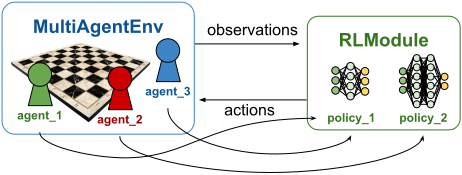
Multi-agent setup: N agents live in the environment and take actions computed by M policy networks.
A user-provided mapping function determines this agent-to-policy mapping. Here, agent_1
and agent_3 both map to policy_1, whereas agent_2 maps to policy_2.#
RLlib’s MultiAgentEnv API#
Hint
This section describes RLlib’s own MultiAgentEnv API, the recommended way to define your own multi-agent environment logic. If you already use a third-party multi-agent API, RLlib offers wrappers for Farama’s PettingZoo API and DeepMind’s OpenSpiel API.
RLlib’s MultiAgentEnv API closely follows the conventions and APIs of Farama’s gymnasium (single-agent) envs and even subclasses gymnasium.Env. Instead of returning individual observations, rewards, and termination and truncation flags from reset() and step(), a custom MultiAgentEnv implementation returns separate dictionaries for observations, rewards, and the other per-step values. Each dictionary maps agent IDs to that agent’s value.
Here’s a first draft of an example MultiAgentEnv implementation:
from ray.rllib.env.multi_agent_env import MultiAgentEnv

class MyMultiAgentEnv(MultiAgentEnv):

    def __init__(self, config=None):
        super().__init__()
        ...

    def reset(self, *, seed=None, options=None):
        ...
        # return observation dict and infos dict.
        return {"agent_1": [obs of agent_1], "agent_2": [obs of agent_2]}, {}

    def step(self, action_dict):
        # return observation dict, rewards dict, termination/truncation dicts, and infos dict
        return {"agent_1": [obs of agent_1]}, {...}, ...
Agent definitions#
Your MultiAgentEnv code fully controls the number of agents in your environment and their IDs. Your env decides which agents start after an episode reset, which agents enter the episode later, which agents terminate the episode early, and which agents stay until the episode ends.
To define which agent IDs might show up in your episodes, set the self.possible_agents attribute to a list of all possible agent IDs.
def __init__(self, config=None):
    super().__init__()
    ...
    # Define all agent IDs that might even show up in your episodes.
    self.possible_agents = ["agent_1", "agent_2"]
    ...
If your environment starts with only a subset of agent IDs, or terminates some agent IDs before the episode ends, you also need to adjust the self.agents attribute throughout the episode. If instead all agent IDs are static throughout your episodes, set self.agents to the same value as self.possible_agents and don’t change it in the rest of your code:
def __init__(self, config=None):
    super().__init__()
    ...
    # If your agents never change throughout the episode, set
    # `self.agents` to the same list as `self.possible_agents`.
    self.agents = self.possible_agents = ["agent_1", "agent_2"]
    # Otherwise, you will have to adjust `self.agents` in `reset()` and `step()` to whatever the
    # currently "alive" agents are.
    ...
Observation and action spaces#
Next, set the observation and action spaces of each possible agent ID in your constructor. Use the self.observation_spaces and self.action_spaces attributes to define dictionaries that map agent IDs to each agent’s spaces. For example:
import gymnasium as gym
import numpy as np

...

    def __init__(self, config=None):
        super().__init__()
        ...
        self.observation_spaces = {
            "agent_1": gym.spaces.Box(-1.0, 1.0, (4,), np.float32),
            "agent_2": gym.spaces.Box(-1.0, 1.0, (3,), np.float32),
        }
        self.action_spaces = {
            "agent_1": gym.spaces.Discrete(2),
            "agent_2": gym.spaces.Box(0.0, 1.0, (1,), np.float32),
        }
        ...
If your episodes host many agents, some sharing the same observation or action spaces, and you don’t want to create large spaces dicts, override the get_observation_space() and get_action_space() methods and implement the agent-ID-to-space mapping logic yourself. For example:
def get_observation_space(self, agent_id):
    if agent_id.startswith("robot_"):
        return gym.spaces.Box(0, 255, (84, 84, 3), np.uint8)
    elif agent_id.startswith("decision_maker"):
        return gym.spaces.Discrete(2)
    else:
        raise ValueError(f"bad agent id: {agent_id}!")
Observation, reward, and termination dictionaries#
The remaining two methods you need to implement in your custom MultiAgentEnv are reset() and step(). As with a single-agent gymnasium.Env, you return observations and infos from reset(), and observations, rewards, termination and truncation flags, and infos from step(). Instead of individual values, these are all dictionaries that map agent IDs to each agent’s value.
Take a look at an example reset() implementation first:
def reset(self, *, seed=None, options=None):
    ...
    return {
        "agent_1": np.array([0.0, 1.0, 0.0, 0.0]),
        "agent_2": np.array([0.0, 0.0, 1.0]),
    }, {}  # <- empty info dict
Here, your episode starts with both agents in it, and both must compute and send actions for the following step() call.
In general, the returned observations dict must contain those agents that should act next, and only those agents. An agent ID that shouldn’t act in the next step() call must not have its observation in the dict.
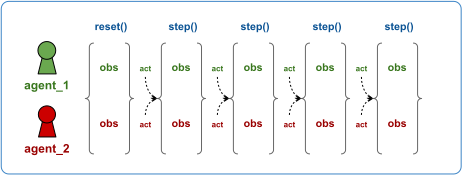
Env with simultaneously acting agents: Both agents receive their observations at each
time step, including right after reset(). An agent must compute and send an action
into the next step() call whenever an observation is present for that agent in the returned
observations dict.#
The rule that observation dicts determine the exact order of agent moves doesn’t apply to reward dicts or termination and truncation dicts. These dicts can contain any agent ID at any time step, whether or not that agent ID should act in the next step() call. This way, an action by agent A can trigger a reward for agent B, even when agent B isn’t acting itself. The same holds for termination flags: agent A can act in a way that terminates agent B from the episode without agent B having acted itself.
Note
Use the special agent ID __all__ in the termination or truncation dicts to indicate that the episode should end for all agent IDs, regardless of which agents are still active at that point. In this case, RLlib automatically terminates all agents and ends the episode.
In summary, the agent IDs contained in or missing from your observations dicts determine the exact order and synchronization of agent actions in your multi-agent episode. The returned observation dict must contain only those agent IDs that compute and send actions into the next step() call.
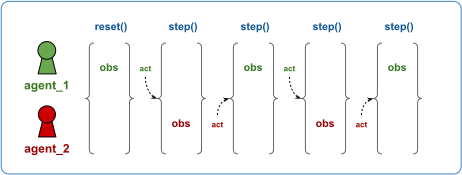
Env with agents taking turns: The two agents act by taking alternating turns. agent_1 receives the
first observation after the reset() and thus computes and sends an action first. Upon receiving
this action, the env responds with an observation for agent_2, who now has to act. After receiving the action
for agent_2, the env returns an observation for agent_1, and so on.#
With this rule, you can design any type of multi-agent environment, from turn-based games, to environments where all agents always act simultaneously, to any complex combination of these two patterns:
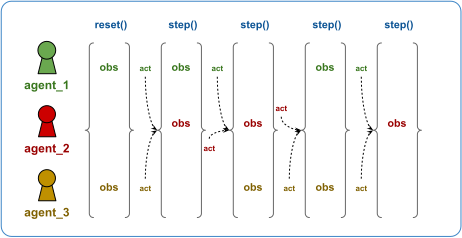
Env with a complex order of turns: Three agents act in a seemingly chaotic order. agent_1 and agent_3 receive their
initial observation after the reset() and thus compute and send actions first. Upon receiving
these two actions, the env responds with an observation for agent_1 and agent_2, who now have to act simultaneously.
After receiving the actions for agent_1 and agent_2, the env returns observations for agent_2 and agent_3, and so on.#
Take a look at two complete MultiAgentEnv example implementations: one where agents always act simultaneously and one where agents act in a turn-based sequence.
Example: Environment with simultaneously stepping agents#
A simple example of a multi-agent env where all agents always step simultaneously is the Rock-Paper-Scissors game. Two agents play N moves altogether, each choosing one of three actions: Rock, Paper, or Scissors. After each move, the env compares the action choices. Rock beats Scissors, Paper beats Rock, and Scissors beats Paper. The player who wins the move receives a +1 reward, and the loser receives -1.
Here’s the initial class scaffold for your Rock-Paper-Scissors game:
import gymnasium as gym

from ray.rllib.env.multi_agent_env import MultiAgentEnv


class RockPaperScissors(MultiAgentEnv):
    """Two-player environment for the famous rock paper scissors game.
    Both players always move simultaneously over a course of 10 timesteps in total.
    The winner of each timestep receives reward of +1, the losing player -1.0.

    The observation of each player is the last opponent action.
    """

    ROCK = 0
    PAPER = 1
    SCISSORS = 2
    LIZARD = 3
    SPOCK = 4

    WIN_MATRIX = {
        (ROCK, ROCK): (0, 0),
        (ROCK, PAPER): (-1, 1),
        (ROCK, SCISSORS): (1, -1),
        (PAPER, ROCK): (1, -1),
        (PAPER, PAPER): (0, 0),
        (PAPER, SCISSORS): (-1, 1),
        (SCISSORS, ROCK): (-1, 1),
        (SCISSORS, PAPER): (1, -1),
        (SCISSORS, SCISSORS): (0, 0),
    }
Next, implement the constructor of your class:
    def __init__(self, config=None):
        super().__init__()

        self.agents = self.possible_agents = ["player1", "player2"]

        # The observations are always the last taken actions. Hence observation- and
        # action spaces are identical.
        self.observation_spaces = self.action_spaces = {
            "player1": gym.spaces.Discrete(3),
            "player2": gym.spaces.Discrete(3),
        }
        self.last_move = None
        self.num_moves = 0
The constructor specifies self.agents = self.possible_agents to indicate that the agents don’t change over an episode and stay fixed at [player1, player2].
The reset logic adds both players to the returned observations dict, because both players act simultaneously in the next step() call. It also resets a num_moves counter that tracks the number of moves played, so the episode ends after exactly 10 timesteps, or 10 actions by either player:
    def reset(self, *, seed=None, options=None):
        self.num_moves = 0

        # The first observation should not matter (none of the agents has moved yet).
        # Set them to 0.
        return {
            "player1": 0,
            "player2": 0,
        }, {}  # <- empty infos dict
Finally, your step method handles the next observations, the rewards, and the termination dict. Each player observes the action the opponent chose. The rewards are +1 or -1 according to the winner and loser rules described earlier. You set the special __all__ agent ID in the termination dict to True only when the number of moves reaches 10. The truncateds and infos dicts always remain empty:
    def step(self, action_dict):
        self.num_moves += 1

        move1 = action_dict["player1"]
        move2 = action_dict["player2"]

        # Set the next observations (simply use the other player's action).
        # Note that because we are publishing both players in the observations dict,
        # we expect both players to act in the next `step()` (simultaneous stepping).
        observations = {"player1": move2, "player2": move1}

        # Compute rewards for each player based on the win-matrix.
        r1, r2 = self.WIN_MATRIX[move1, move2]
        rewards = {"player1": r1, "player2": r2}

        # Terminate the entire episode (for all agents) once 10 moves have been made.
        terminateds = {"__all__": self.num_moves >= 10}

        # Leave truncateds and infos empty.
        return observations, rewards, terminateds, {}, {}
For a complete end-to-end example script that shows how to run a multi-agent RLlib setup against your RockPaperScissors env, see the agents_act_simultaneously.py example.
Example: Turn-based environments#
Now walk through another multi-agent env example implementation, but this time a turn-based game with two players, A and B. A starts the game, then B makes a move, then A again, and so on.
This example implements the Tic-Tac-Toe game with one slight change, played on a 3x3 field. Each player adds one of their pieces to the field at a time, and pieces can’t be moved once placed. The first player to complete one row, horizontal, diagonal, or vertical, wins the game and receives a +1 reward. The losing player receives a -1 reward. To make the implementation easier, the change from the original game is that placing a piece on an already occupied field leaves the board unchanged, but the moving player receives a -5 reward as a penalty. In the original game, this move isn’t allowed and can never happen.
Here’s your initial class scaffold for the Tic-Tac-Toe game:
import random

import gymnasium as gym
import numpy as np

from ray.rllib.env.multi_agent_env import MultiAgentEnv


class TicTacToe(MultiAgentEnv):
    """A two-player game in which any player tries to complete one row in a 3x3 field.

    The observation space is Box(-1.0, 1.0, (9,)), where each index represents a distinct
    field on a 3x3 board. From the current player's perspective: 1.0 means we occupy the
    field, -1.0 means the opponent owns the field, and 0.0 means the field is empty:
    ----------
    | 0| 1| 2|
    ----------
    | 3| 4| 5|
    ----------
    | 6| 7| 8|
    ----------

    The action space is Discrete(9). Actions landing on an already occupied field
    result in a -1.0 penalty for the player taking the invalid action.

    Once a player completes a row, they receive +1.0 reward, the losing player receives
    -1.0 reward. A draw results in 0.0 reward for both players.
    """
In your constructor, define all possible agent IDs that can show up in your game, player1 and player2, the active agent IDs, which are the same as all possible agents, and each agent’s observation and action spaces.
    def __init__(self, config=None):
        super().__init__()

        # Define the agents in the game.
        self.agents = self.possible_agents = ["player1", "player2"]

        # Each agent observes a 9D tensor, representing the 3x3 fields of the board.
        # From the current player's perspective: 1 means our piece, -1 means opponent's
        # piece, 0 means empty. The board is flipped after each turn.
        self.observation_spaces = {
            "player1": gym.spaces.Box(-1.0, 1.0, (9,), np.float32),
            "player2": gym.spaces.Box(-1.0, 1.0, (9,), np.float32),
        }
        # Each player has 9 actions, encoding the 9 fields each player can place a piece
        # on during their turn.
        self.action_spaces = {
            "player1": gym.spaces.Discrete(9),
            "player2": gym.spaces.Discrete(9),
        }
        self.max_timesteps = 30

        self.board = None
        self.current_player = None
        self.timestep = 0
Now implement your reset() method. Empty the board by setting it to all zeros, pick a random start player, and return that start player’s first observation. You don’t return the other player’s observation, because that player doesn’t act next.
    def reset(self, *, seed=None, options=None):
        self.board = [0] * 9

        # Pick a random player to start the game and reset the current timesteps.
        self.current_player = random.choice(self.agents)
        self.timestep = 0

        # Return observations dict (only with the starting player, which is the one
        # we expect to act next).
        return {self.current_player: np.array(self.board, np.float32)}, {}
From here on, each step() flips between the two agents. Use the self.current_player attribute to keep track, and return only the current agent’s observation, because that’s the player you want to act next.
You also compute both agents’ rewards based on three criteria. Did the current player win, meaning the opponent lost? Did the current player place a piece on an already occupied field, which gets penalized? Is the game done because the board is full, in which case both agents receive 0 reward?
    def step(self, action_dict):
        action = action_dict[self.current_player]
        opponent = "player2" if self.current_player == "player1" else "player1"
        self.timestep += 1

        # Invalid move: penalize and return without changing board.
        if self.board[action] != 0:
            # The time limit is reached
            if self.timestep >= self.max_timesteps:
                board_arr = np.array(self.board, np.float32)
                return (
                    {self.current_player: board_arr, opponent: board_arr * -1},
                    {self.current_player: -0.5, opponent: 0.0},
                    {"__all__": False},
                    {"__all__": True},
                    {},
                )
            else:
                reward = {self.current_player: -0.5}
                self.board = [-x for x in self.board]
                self.current_player = opponent
                return (
                    {opponent: np.array(self.board, np.float32)},
                    reward,
                    {"__all__": False},
                    {"__all__": False},
                    {},
                )

        # Place the piece on the board.
        self.board[action] = 1

        # Check for win.
        if any(all(self.board[i] == 1 for i in line) for line in self.WIN_LINES):
            board_arr = np.array(self.board, np.float32)
            return (
                {self.current_player: board_arr, opponent: board_arr * -1},
                {self.current_player: 1.0, opponent: -1.0},
                {"__all__": True},
                {"__all__": False},
                {},
            )

        # Check for draw (board full, no winner).
        if 0 not in self.board:
            board_arr = np.array(self.board, np.float32)
            return (
                {self.current_player: board_arr, opponent: board_arr * -1},
                {self.current_player: 0.0, opponent: 0.0},
                {"__all__": True},
                {"__all__": False},
                {},
            )

        # Check for truncation.
        if self.timestep >= self.max_timesteps:
            board_arr = np.array(self.board, np.float32)
            return (
                {self.current_player: board_arr, opponent: board_arr * -1},
                {self.current_player: 0.0, opponent: 0.0},
                {"__all__": False},
                {"__all__": True},
                {},
            )

        # Continue game: flip board and switch player.
        reward = {self.current_player: 0.0}
        self.board = [-x for x in self.board]
        self.current_player = opponent

        return (
            {opponent: np.array(self.board, np.float32)},
            reward,
            {"__all__": False},
            {"__all__": False},
            {},
        )
Grouping agents#
In multi-agent RL, you commonly have groups of agents, where RLlib treats each group as a single agent with Tuple action and observation spaces. The tuple holds one item for each agent in the group.
You can then assign such a group of agents to a single policy for centralized execution, or to specialized multi-agent policies that implement centralized training but decentralized execution.
You can use the with_agent_groups() method to define these groups:
    def with_agent_groups(
        self,
        groups: Dict[str, List[AgentID]],
        obs_space: gym.Space = None,
        act_space: gym.Space = None,
    ) -> "MultiAgentEnv":
        """Convenience method for grouping together agents in this env.

        An agent group is a list of agent IDs that are mapped to a single
        logical agent. All agents of the group must act at the same time in the
        environment. The grouped agent exposes Tuple action and observation
        spaces that are the concatenated action and obs spaces of the
        individual agents.

        The rewards of all the agents in a group are summed. The individual
        agent rewards are available under the "individual_rewards" key of the
        group info return.

        Agent grouping is required to leverage algorithms such as Q-Mix.

        Args:
            groups: Mapping from group id to a list of the agent ids
                of group members. If an agent id is not present in any group
                value, it will be left ungrouped. The group id becomes a new agent ID
                in the final environment.
            obs_space: Optional observation space for the grouped
                env. Must be a tuple space. If not provided, will infer this to be a
                Tuple of n individual agents spaces (n=num agents in a group).
            act_space: Optional action space for the grouped env.
                Must be a tuple space. If not provided, will infer this to be a Tuple
                of n individual agents spaces (n=num agents in a group).

        Returns:
            A new MultiAgentEnv (a `GroupAgentsWrapper` around `self`), in which the
            agents of each group are combined into one single (grouped) agent.

        .. testcode::
            :skipif: True

            from ray.rllib.env.multi_agent_env import MultiAgentEnv
            class MyMultiAgentEnv(MultiAgentEnv):
                # define your env here
                ...
            env = MyMultiAgentEnv(...)
            grouped_env = env.with_agent_groups(env, {
              "group1": ["agent1", "agent2", "agent3"],
              "group2": ["agent4", "agent5"],
            })

        """

        from ray.rllib.env.wrappers.group_agents_wrapper import GroupAgentsWrapper
        return GroupAgentsWrapper(self, groups, obs_space, act_space)
For environments with multiple groups, or mixtures of agent groups and individual agents, use grouping together with the policy mapping API described earlier.
Third-party multi-agent env APIs#
Besides RLlib’s own MultiAgentEnv API, you can use third-party APIs and libraries to implement custom multi-agent envs.
Farama PettingZoo#
PettingZoo offers a repository of over 50 multi-agent environments, directly compatible with RLlib through the built-in PettingZooEnv wrapper:
from pettingzoo.butterfly import pistonball_v6

from ray.rllib.algorithms.ppo import PPOConfig
from ray.rllib.env.wrappers.pettingzoo_env import PettingZooEnv
from ray.tune.registry import register_env

register_env(
    "pistonball",
    lambda cfg: PettingZooEnv(pistonball_v6.env(num_floors=cfg.get("n_pistons", 20))),
)

config = (
    PPOConfig()
    .environment("pistonball", env_config={"n_pistons": 30})
)
For an end-to-end example with the water world env, see the PettingZoo parameter-sharing example script.
For an example on the pistonball env with RLlib, see the PettingZoo RLlib tutorial.
DeepMind OpenSpiel#
The OpenSpiel API by DeepMind is a framework for research and development in multi-agent reinforcement learning, game theory, and decision-making. The API is directly compatible with RLlib through the built-in OpenSpielEnv wrapper:
import pyspiel  # pip install open_spiel

from ray.rllib.algorithms.ppo import PPOConfig
from ray.rllib.env.wrappers.open_spiel import OpenSpielEnv
from ray.tune.registry import register_env

register_env(
    "open_spiel_env",
    lambda cfg: OpenSpielEnv(pyspiel.load_game("connect_four")),
)

config = PPOConfig().environment("open_spiel_env")
See the end-to-end example with the Connect-4 env of OpenSpiel, trained by an RLlib algorithm using a self-play strategy.
Run training experiments with a MultiAgentEnv#
If all agents use the same algorithm class to train their policies, configure multi-agent training as follows:
from ray.rllib.algorithms.ppo import PPOConfig
from ray.rllib.core.rl_module.multi_rl_module import MultiRLModuleSpec
from ray.rllib.core.rl_module.rl_module import RLModuleSpec

config = (
    PPOConfig()
    .environment(env="my_multiagent_env")
    .multi_agent(
        policy_mapping_fn=lambda agent_id, episode, **kwargs: (
            "traffic_light" if agent_id.startswith("traffic_light_")
            else random.choice(["car1", "car2"])
        ),
        algorithm_config_overrides_per_module={
            "car1": PPOConfig.overrides(gamma=0.85),
            "car2": PPOConfig.overrides(lr=0.00001),
        },
    )
    .rl_module(
        rl_module_spec=MultiRLModuleSpec(rl_module_specs={
            "car1": RLModuleSpec(),
            "car2": RLModuleSpec(),
            "traffic_light": RLModuleSpec(),
        }),
    )
)

algo = config.build()
print(algo.train())
To exclude certain policies from updates, use the config.multi_agent(policies_to_train=[..]) config setting. With this setting, you can run in multi-agent environments that mix non-learning and learning policies:
def policy_mapping_fn(agent_id, episode, **kwargs):
    agent_idx = int(agent_id[-1])  # 0 (player1) or 1 (player2)
    return "learning_policy" if episode.id_ % 2 == agent_idx else "random_policy"

config = (
    PPOConfig()
    .environment(env="two_player_game")
    .multi_agent(
        policy_mapping_fn=policy_mapping_fn,
        policies_to_train=["learning_policy"],
    )
    .rl_module(
        rl_module_spec=MultiRLModuleSpec(rl_module_specs={
            "learning_policy": RLModuleSpec(),
            "random_policy": RLModuleSpec(rl_module_class=RandomRLModule),
        }),
    )
)

algo = config.build()
print(algo.train())
RLlib creates and routes decisions to each policy based on the provided policy_mapping_fn. It reports training statistics for each policy separately in the result dict returned by train().
The example scripts rock_paper_scissors_heuristic_vs_learned.py and rock_paper_scissors_learned_vs_learned.py demonstrate competing policies with heuristic and learned strategies.
Scale to many MultiAgentEnvs per EnvRunner#
Note
Unlike single-agent environments, multi-agent setups aren’t vectorizable yet. The Ray team is working on a solution that uses the gymnasium >= 1.x custom vectorization feature.
Variable sharing between policies#
RLlib supports variable sharing across policies.
See the PettingZoo parameter sharing example for details.