Ray Event Export#
Starting from 2.49, Ray supports exporting structured events to a configured HTTP endpoint. Each node sends events to the endpoint through an HTTP POST request.
Previously, Ray’s task events were only used internally by the Ray dashboard and State API for monitoring and debugging. With the new event export feature, you can now send these raw events to external systems for custom analytics, monitoring, and integration with third-party tools.
Note
Ray Event Export is still in alpha. The way to configure event reporting and the format of the events is subject to change.
Enable event reporting#
To enable event reporting, you need to set the RAY_enable_core_worker_ray_event_to_aggregator environment variable to 1 when starting each Ray worker node.
To set the target HTTP endpoint, set the RAY_DASHBOARD_AGGREGATOR_AGENT_EVENTS_EXPORT_ADDR environment variable to a valid HTTP URL with the http:// URL scheme.
Event format#
Events are JSON objects in the POST request body.
All events contain the same base fields and different event specific fields. See src/ray/protobuf/public/events_base_event.proto for the base fields.
Task events#
For each task, Ray exports two types of events: Task Definition Event and Task Execution Event.
Each task attempt generates one Task Definition Event which contains the metadata of the task. See src/ray/protobuf/public/events_task_definition_event.proto and src/ray/protobuf/public/events_actor_task_definition_event.proto for the event formats for normal tasks and actor tasks respectively.
Task Execution Events contain task state transition information and metadata generated during task execution. See src/ray/protobuf/public/events_task_lifecycle_event.proto for the event format.
An example of a Task Definition Event and a Task Execution Event:
// task definition event
{
    "eventId":"N5n229xkwyjlZRFJDF2G1sh6ZNYlqChwJ4WPEQ==",
    "sourceType":"CORE_WORKER",
    "eventType":"TASK_DEFINITION_EVENT",
    "timestamp":"2025-09-03T18:52:14.467290Z",
    "severity":"INFO",
    "sessionName":"session_2025-09-03_11-52-12_635210_85618",
    "taskDefinitionEvent":{
        "taskId":"yO9FzNARJXH///////////////8BAAAA",
        "taskFunc":{
            "pythonFunctionDescriptor":{
                "moduleName":"test-tasks",
                "functionName":"test_task",
                "functionHash":"37ddb110c0514b049bd4db5ab934627b",
                "className":""
            }
        },
        "taskName":"test_task",
        "requiredResources":{
            "CPU":1.0
        },
        "serialized_runtime_env": "{}",
        "jobId":"AQAAAA==",
        "parentTaskId":"//////////////////////////8BAAAA",
        "placementGroupId":"////////////////////////",
        "taskAttempt":0,
        "taskType":"NORMAL_TASK",
        "language":"PYTHON",
        "refIds":{

        }
    },
    "nodeId":"ZvxTI6x9dlMFqMlIHErJpg5UEGK1INsKhW2zyg==",
    "message":""
}

// task lifecycle event
{
    "eventId":"vkIaAHlQC5KoppGosqs2kBq5k2WzsAAbawDDbQ==",
    "sourceType":"CORE_WORKER",
    "eventType":"TASK_LIFECYCLE_EVENT",
    "timestamp":"2025-09-03T18:52:14.469074Z",
    "severity":"INFO",
    "sessionName":"session_2025-09-03_11-52-12_635210_85618",
    "taskLifecycleEvent":{
        "taskId":"yO9FzNARJXH///////////////8BAAAA",
        "stateTransitions": [
            {
                "state":"PENDING_NODE_ASSIGNMENT",
                "timestamp":"2025-09-03T18:52:14.467402Z"
            },
            {
                "state":"PENDING_ARGS_AVAIL",
                "timestamp":"2025-09-03T18:52:14.467290Z"
            },
            {
                "state":"SUBMITTED_TO_WORKER",
                "timestamp":"2025-09-03T18:52:14.469074Z"
            }
        ],
        "nodeId":"ZvxTI6x9dlMFqMlIHErJpg5UEGK1INsKhW2zyg==",
        "workerId":"hMybCNYIFi+/yInYYhdc+qH8yMF65j/8+uCTmw==",
        "jobId":"AQAAAA==",
        "taskAttempt":0,
        "workerPid":0
    },
    "nodeId":"ZvxTI6x9dlMFqMlIHErJpg5UEGK1INsKhW2zyg==",
    "message":""
}
Actor events#
For each actor, Ray exports two types of events: Actor Definition Events and Actor Lifecycle Events.
An Actor Definition Event contains the metadata of the actor when it is defined. See src/ray/protobuf/public/events_actor_definition_event.proto for the event format.
An Actor Lifecycle Event contains the actor state transition information and metadata associated with each transition. See src/ray/protobuf/public/events_actor_lifecycle_event.proto for the event format.
// actor definition event
{
    "eventId": "gsRtAfaWn5TZsjUPFm8nOXd/cKGz82FXdr3Lqg==",
    "sourceType": "GCS",
    "eventType": "ACTOR_DEFINITION_EVENT",
    "timestamp": "2025-10-24T21:12:10.742651Z",
    "severity": "INFO",
    "sessionName": "session_2025-10-24_14-12-05_804800_55420",
    "actorDefinitionEvent": {
        "actorId": "0AFtngcXtEoxwqmJAQAAAA==",
        "jobId": "AQAAAA==",
        "name": "actor-test",
        "rayNamespace": "bd2ad7f8-650b-495c-b709-55d4c8a7d09f",
        "serializedRuntimeEnv": "{}",
        "className": "test_ray_actor_events.<locals>.A",
        "isDetached": false,
        "requiredResources": {},
        "placementGroupId": "",
        "labelSelector": {}
    },
    "nodeId": "zpLG7coqThVMl8df9RYHnhK6thhJqrgPodtfjg==",
    "message": ""
}

// actor lifecycle event
{
    "eventId": "mOdfn5SRx3X0B05OvEDV0rcIOzqf/SGBJmrD/Q==",
    "sourceType": "GCS",
    "eventType": "ACTOR_LIFECYCLE_EVENT",
    "timestamp": "2025-10-24T21:12:10.742654Z",
    "severity": "INFO",
    "sessionName": "session_2025-10-24_14-12-05_804800_55420",
    "actorLifecycleEvent": {
        "actorId": "0AFtngcXtEoxwqmJAQAAAA==",
        "stateTransitions": [
            {
                "timestamp": "2025-10-24T21:12:10.742654Z",
                "state": "ALIVE",
                "nodeId": "zpLG7coqThVMl8df9RYHnhK6thhJqrgPodtfjg==",
                "workerId": "nrBehSG3HXu0PvHZBkPl2kovmjzAaoCuVj2KHA=="
            }
        ]
    },
    "nodeId": "zpLG7coqThVMl8df9RYHnhK6thhJqrgPodtfjg==",
    "message": ""
}
Driver job events#
For each driver job, Ray exports two types of events: Driver Job Definition Events and Driver Job Lifecycle Events.
A Driver Job Definition Event contains the metadata of the driver job when it is defined. See src/ray/protobuf/public/events_driver_job_definition_event.proto for the event format.
A Driver Job Lifecycle Event contains the driver job state transition information and metadata associated with each transition. See src/ray/protobuf/public/events_driver_job_lifecycle_event.proto for the event format.
// driver job definition event
{
    "eventId": "7YnwZPJr0KUC28T7KnzsvGyceEIrjNDTHuQfrg==",
    "sourceType": "GCS",
    "eventType": "DRIVER_JOB_DEFINITION_EVENT",
    "timestamp": "2025-10-24T21:17:07.316482Z",
    "severity": "INFO",
    "sessionName": "session_2025-10-24_14-17-05_575968_59360",
    "driverJobDefinitionEvent": {
        "jobId": "AQAAAA==",
        "driverPid": "59360",
        "driverNodeId": "9eHWUIruJWnMjQuPas0W+TRNUyjY5PwFpWUfjA==",
        "entrypoint": "...",
        "config": {
            "serializedRuntimeEnv": "{}",
            "metadata": {}
        }
    },
    "nodeId": "zpLG7coqThVMl8df9RYHnhK6thhJqrgPodtfjg==",
    "message": ""
}

// driver job lifecycle event
{
    "eventId": "0cmbCI/RQghYe4ZQiJ+HrnK1RiZH+cg8ltBx2w==",
    "sourceType": "GCS",
    "eventType": "DRIVER_JOB_LIFECYCLE_EVENT",
    "timestamp": "2025-10-24T21:17:07.316483Z",
    "severity": "INFO",
    "sessionName": "session_2025-10-24_14-17-05_575968_59360",
    "driverJobLifecycleEvent": {
        "jobId": "AQAAAA==",
        "stateTransitions": [
            {
                "state": "CREATED",
                "timestamp": "2025-10-24T21:17:07.316483Z"
            }
        ]
    },
    "nodeId": "zpLG7coqThVMl8df9RYHnhK6thhJqrgPodtfjg==",
    "message": ""
}
Node events#
For each node, Ray exports two types of events: Node Definition Events and Node Lifecycle Events.
A Node Definition Event contains the metadata of the node when it is defined. See src/ray/protobuf/public/events_node_definition_event.proto for the event format.
A Node Lifecycle Event contains the node state transition information and metadata associated with each transition. See src/ray/protobuf/public/events_node_lifecycle_event.proto for the event format.
// node definition event
{
    "eventId": "l7r4gwq4UPhmZGFJYEym6mUkcxqafra60LB6/Q==",
    "sourceType": "GCS",
    "eventType": "NODE_DEFINITION_EVENT",
    "timestamp": "2025-10-24T21:19:14.063953Z",
    "severity": "INFO",
    "sessionName": "session_2025-10-24_14-19-12_675240_61141",
    "nodeDefinitionEvent": {
        "nodeId": "0yfRX1ex+VtcC+TFXjXcgesdpnEwM76+pEATrQ==",
        "nodeIpAddress": "127.0.0.1",
        "labels": {
            "ray.io/node-id": "d327d15f57b1f95b5c0be4c55e35dc81eb1da6713033bebea44013ad"
        },
        "startTimestamp": "2025-10-24T21:19:14.063Z"
    },
    "nodeId": "zpLG7coqThVMl8df9RYHnhK6thhJqrgPodtfjg==",
    "message": ""
}

// node lifecycle event
{
    "eventId": "u3KTG8615MIKBH5PLcii0BMfGFWcvLuSOXM6zg==",
    "sourceType": "GCS",
    "eventType": "NODE_LIFECYCLE_EVENT",
    "timestamp": "2025-10-24T21:19:14.063955Z",
    "severity": "INFO",
    "sessionName": "session_2025-10-24_14-19-12_675240_61141",
    "nodeLifecycleEvent": {
        "nodeId": "0yfRX1ex+VtcC+TFXjXcgesdpnEwM76+pEATrQ==",
        "stateTransitions": [
            {
                "timestamp": "2025-10-24T21:19:14.063955Z",
                "resources": {"node:__internal_head__": 1.0, "CPU": 1.0, "object_store_memory": 157286400.0, "node:127.0.0.1": 1.0, "memory": 42964287488.0},
                "state": "ALIVE",
                "aliveSubState": "UNSPECIFIED"
            }
        ]
    },
    "nodeId": "zpLG7coqThVMl8df9RYHnhK6thhJqrgPodtfjg==",
    "message": ""
}
High-level architecture#
The following diagram shows the high-level architecture of Ray Event Export.
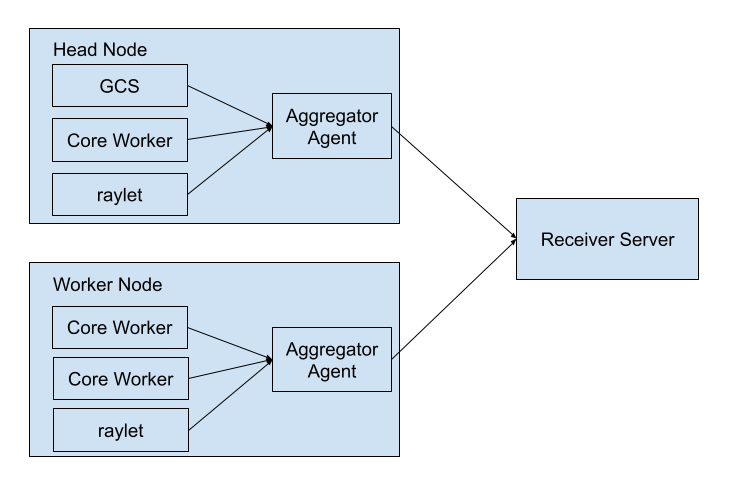
All Ray components send events to an aggregator agent through gRPC. There is an aggregator agent on each node. The aggregator agent collects all events on that node and sends the events to the configured HTTP endpoint.
Store task events on the Ray API server#
Starting in Ray 2.58, Ray can store task events on the Ray API server, the head node process that also serves the Ray Dashboard, instead of on the Global Control Service (GCS). This option reduces GCS memory usage and lets the GCS focus on control plane work. Task events are the first data set to move out of the GCS.
Reading task events doesn’t change. ray list tasks, ray.timeline()/ray timeline, and the Ray Dashboard return the same data, and Ray applies the same storage limit and eviction policy that it applies in the GCS. For the components that implement this path, see the event exporter internals.
Note
This migration is in progress. By default, Ray still stores task events in the GCS. Ray uses the Ray API server only when you set the environment variables in the following section.
Enable task event storage on the Ray API server#
Set the following environment variables when you start each Ray node:
export RAY_enable_ray_event=1
export RAY_enable_ray_task_event_recorder=1
export RAY_enable_core_worker_task_event_to_gcs=0
export RAY_enable_task_events_to_dashboard_head=1
Each variable controls one part of the path:
RAY_enable_ray_event=1to use Ray event export as the event collection backend. Ray records task events for this path only when you set this variable.RAY_enable_ray_task_event_recorder=1to record task events with the Ray task event recorder. When the recorder is active, the core workerTaskEventBufferstops sending events to the aggregator agent, soRAY_enable_core_worker_ray_event_to_aggregatorno longer affects task events.RAY_enable_core_worker_task_event_to_gcs=0to stop the core worker from sending task events to the GCS. When you set this variable to0and enable the recorder, the core workerTaskEventBufferstops recording task events.RAY_enable_task_events_to_dashboard_head=1to complete the migration. This variable makes the aggregator agent publish task events to the Ray API server, starts the task events module there, and pointsray list tasksandray.timeline()/ray timelineat the Ray API server instead of the GCS.
Requirements#
Start your Ray cluster with the dashboard running. Ray starts the dashboard by default when the dashboard component is installed; install it with
ray[default]and see Ray dashboard for setup. The Ray API server serves the task events on this path, soray.timeline()/ray timelineneeds it.ray list tasksand the Ray Dashboard need the dashboard on either path.Ray stores the task events in memory. If the Ray API server restarts, Ray loses the task events that it stored.
Architecture#
The following diagram shows how task events flow after you enable this path.
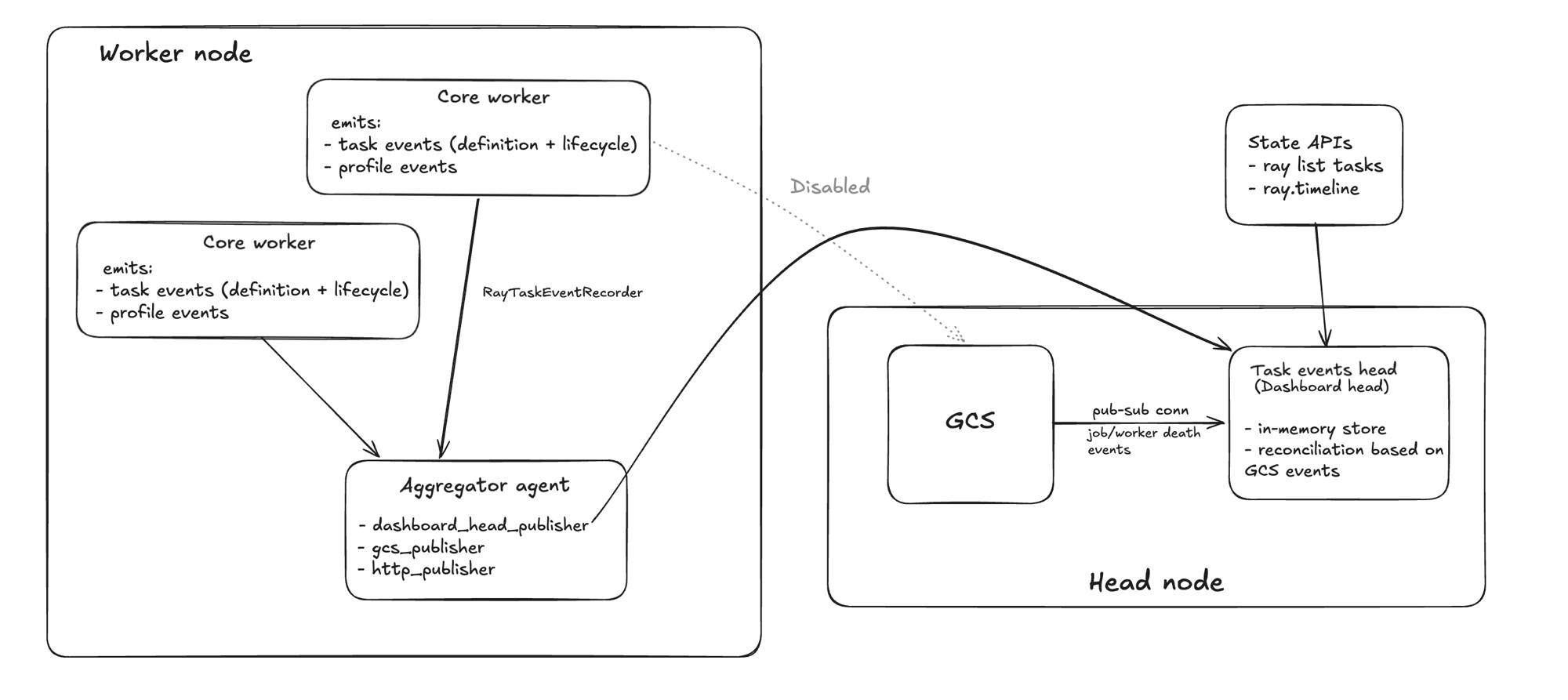
Each core worker emits task definition, lifecycle, and profile events through RayTaskEventRecorder to the aggregator agent on its node. The aggregator agent publishes them to the task events module on the Ray API server. That module stores the task events in memory and reconciles them against the worker death and job completion events that it receives from the GCS over a pub-sub connection. The State APIs read task events from that store. In this configuration, the core worker doesn’t send task events directly to the GCS.