TPU serving#
Ray Serve LLM can run a vLLM TPU engine on single-host and multi-host TPU slices. A TPU slice is a group of interconnected TPU chips. Use TPU serving when your Ray cluster already exposes TPU resources and TPU node labels, and your container image includes either vLLM-TPU or vLLM-TorchTPU. For Kubernetes setup, see Use TPUs with KubeRay.
Topology and placement#
A TPU topology describes the chip grid in one physical TPU slice. For example, a v6e 4x4 slice has 16 chips. Multi-host slices spread those chips across multiple TPU hosts connected by the TPU interconnect. For v6e 4x4, that usually means four hosts with four chips each. For visualization, check out TPU Topology Visualizer.
Ray Serve LLM uses tensor_parallel_size * pipeline_parallel_size as the number of TPU chips that one model replica requests. When you also set a TPU topology, Ray Serve LLM computes the number of chips per host and creates one placement group bundle per TPU host:
LLMConfig(
    accelerator_type="TPU-V6E",
    accelerator_config={"kind": "tpu", "topology": "4x4"},
    engine_kwargs={"tensor_parallel_size": 16},
)
For a v6e 4x4 slice, this produces four host-level bundles:
[
    {"TPU": 4, "accelerator_type:TPU-V6E": 0.001},
    {"TPU": 4, "accelerator_type:TPU-V6E": 0.001},
    {"TPU": 4, "accelerator_type:TPU-V6E": 0.001},
    {"TPU": 4, "accelerator_type:TPU-V6E": 0.001},
]
The model still spans all 16 chips because tensor_parallel_size=16. The bundle shape only tells Ray how to reserve the hosts that own those chips. If you need per-chip bundles, set placement_group_config={"bundle_per_worker": {"TPU": 1}}.
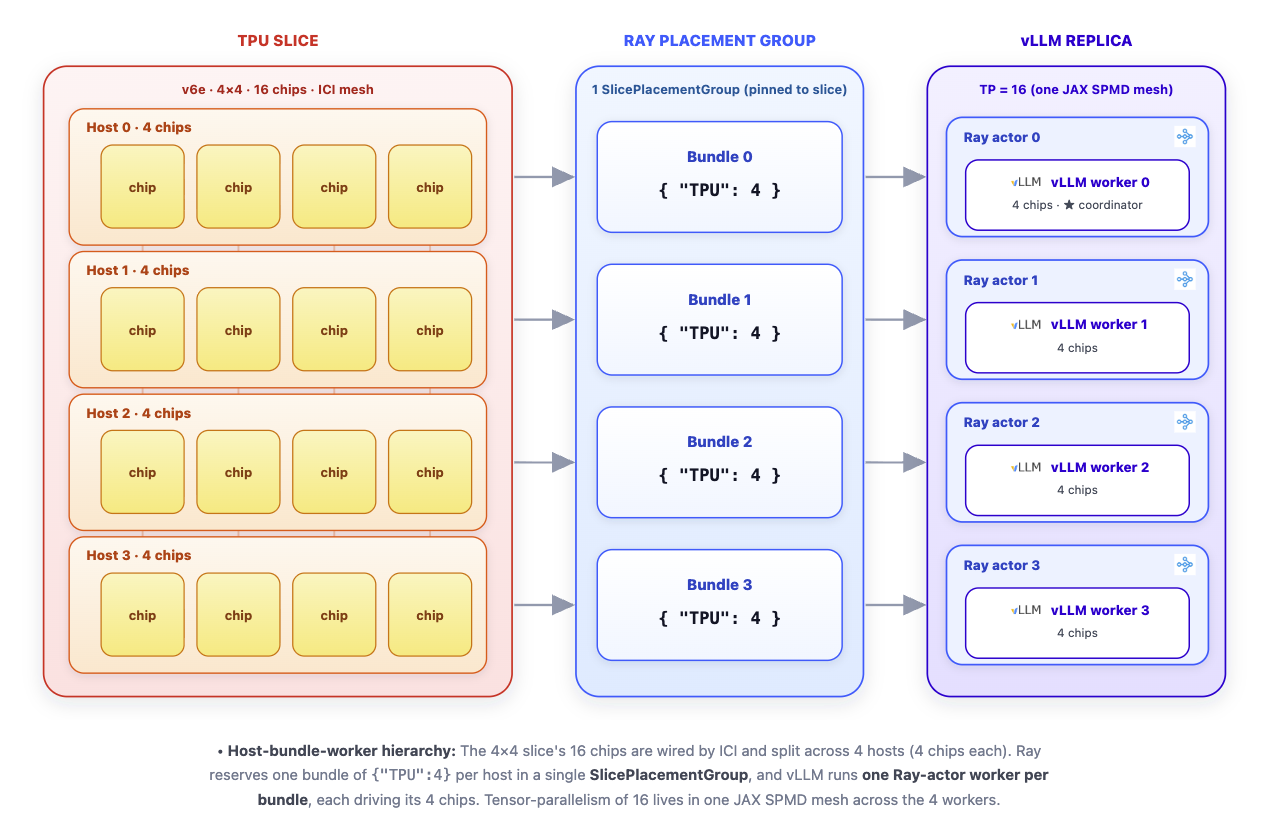
Topology-aware TPU placement for one Ray Serve LLM replica.#
Note
TPU support in Ray Serve LLM is topology-aware when you set accelerator_config={"kind": "tpu", "topology": ...}. Without a topology, Ray Serve LLM falls back to a regular placement group with per-chip {"TPU": 1} bundles.
SlicePlacementGroup#
For topology-aware TPU configs, Ray Serve LLM creates a SlicePlacementGroup instead of a plain placement group. SlicePlacementGroup reserves a matching TPU slice, reads its ray.io/tpu-slice-name label, and creates the worker placement group with a per-bundle label selector that pins all bundles to that same physical slice.
This makes the TPU slice an atomic scheduling unit. A replica reserves the complete slice it needs, and the placement group doesn’t span unrelated slices.
How the TPU vLLM executor uses the bundles#
The vLLM-TPU Ray executor checks parallel_config.placement_group. If Ray Serve LLM already provides one, the executor reuses it instead of creating its own.
The executor then does the following:
Selects the TPU bundles from the placement group.
Reads the TPU count from each bundle.
Starts one Ray worker actor per bundle with
PlacementGroupSchedulingStrategy, pinning each actor to its bundle.
With the default topology-aware bundles, one vLLM worker actor maps to one TPU host and consumes all local TPU chips on that host. The worker process uses the chips across the multi-host slice. Otherwise, manually setting {"TPU": 1} results in the creation of one worker per chip.
When you serve with vLLM-TorchTPU, vLLM runs one worker actor per logical TPU device. On LLMConfig, set placement_group_config={"bundle_per_worker": {"TPU": 1}}, and set "TPU_MULTIHOST_BACKEND": "ray" in runtime_env. For TPU7x, see TPU7x logical devices.
Example#
Build the image from the vLLM TPU base image and install a Ray wheel that includes TPU topology support.
FROM vllm/vllm-tpu:v0.21.0

ENV VLLM_TARGET_DEVICE=tpu
ENV VLLM_XLA_CACHE_PATH=/tmp/vllm_xla_cache
ENV JAX_PLATFORMS=tpu,cpu
ENV TPU_MULTIHOST_BACKEND=ray
ENV TPU_BACKEND_TYPE=jax
ENV ENABLE_PJRT_COMPATIBILITY=true

USER root

# Use a released Ray version or wheel URL that contains TPU topology support.
ARG RAY_PACKAGE="ray"
RUN pip install --no-cache-dir -U "${RAY_PACKAGE}" && \
    pip install --no-cache-dir --no-deps "ray[llm]"

COPY serve_tpu_multihost.py /home/ray/serve_tpu_multihost.py
from ray import serve
from ray.serve.llm import LLMConfig, LLMServingArgs, build_openai_app

llm_config = LLMConfig(
    model_loading_config=dict(
        model_id="google/gemma-4-31B-it",
        model_source="/data/google/gemma-4-31B-it",
    ),
    accelerator_type="TPU-V6E",
    accelerator_config={"kind": "tpu", "topology": "4x4"},
    engine_kwargs=dict(
        tensor_parallel_size=16,
        max_model_len=8192,
        max_num_batched_tokens=8192,
        distributed_executor_backend="ray",
    ),
)

app = build_openai_app(LLMServingArgs(llm_configs=[llm_config]))

if __name__ == "__main__":
    serve.run(app, blocking=True)
FROM vllm/vllm-torchtpu:latest

ARG RAY_PACKAGE="ray[default,llm]"
RUN pip install --no-cache-dir -U "${RAY_PACKAGE}"

COPY serve_tpu_multihost.py /home/ray/serve_tpu_multihost.py
from ray import serve
from ray.serve.llm import LLMConfig, LLMServingArgs, build_openai_app

llm_config = LLMConfig(
    model_loading_config=dict(
        model_id="Qwen/Qwen3-8B",
        model_source="Qwen/Qwen3-8B",
    ),
    accelerator_type="TPU-V6E",
    accelerator_config={"kind": "tpu", "topology": "4x4"},
    # Run one vLLM worker actor per logical TPU device.
    placement_group_config={"bundle_per_worker": {"TPU": 1}},
    runtime_env={
        "env_vars": {
            "TPU_MULTIHOST_BACKEND": "ray",
        }
    },
    engine_kwargs=dict(
        tensor_parallel_size=16,
        max_model_len=4096,
        max_num_batched_tokens=4096,
        distributed_executor_backend="ray",
    ),
)

app = build_openai_app(LLMServingArgs(llm_configs=[llm_config]))

if __name__ == "__main__":
    serve.run(app, blocking=True)
The vLLM-TPU example serves google/gemma-4-31B-it on one v6e 4x4 slice with tensor_parallel_size=16. Set model_source to a local or mounted model path, or another path that all TPU hosts can read. The vLLM-TorchTPU example serves Qwen/Qwen3-8B across one v6e 4x4 slice with one worker per logical TPU device.