How to avoid out-of-memory errors (OOMs)#
Out-of-memory errors (OOMs) are one of the most common issues you encounter with Ray Data.
This guide describes what OOMs look like and how to mitigate them.
For a lower-level explanation of how Ray Data treats memory, see Ray Data memory model and Resource isolation with cgroup v2.
What do OOMs look like?#
OOMs show up in several ways. If you see one or more of the following errors, your job might be using too much memory.
Ray OOM kills#
When the Ray OOM killer proactively kills a task or actor, you might see an error similar to the following:
  Task hungry_hippo failed due to oom. There are infinite oom retries remaining, so the task will be retried. Error: 2 worker(s) were killed due to the node running low on memory. Memory on the node (IP: <ip address>, ID: 92edc4e97e4dac3cee61126133ee7ab6d0a2ee73803623d24a02979d) was 110.69GB / 124.35GB (0.890161)
  OOM kill reason: user cgroup memory upper bound was met or exceeded
  Object store memory usage: [- objects spillable: 0
  - bytes spillable: 0
  - objects unsealed: 0
  - bytes unsealed: 0
  - objects in use: 0
  - bytes in use: 0
  - objects evictable: 0
  - bytes evictable: 0

  - objects created by worker: 0
  - bytes created by worker: 0
  - objects restored: 0
  - bytes restored: 0
  - objects received: 0
  - bytes received: 0
  - objects errored: 0
  - bytes errored: 0

  Eviction Stats:
  (global lru) capacity: 35098657996
  (global lru) used: 0%
  (global lru) num objects: 0
  (global lru) num evictions: 0
  (global lru) bytes evicted: 0]
  Ray killed 2 worker(s) based on the killing policy
  Considered workers: [
  Selected to kill: (Task: job ID=01000000, lease ID=0600000001000000ffffffffffffffffffffffffffffffffffffffffffffffff, task name=hungry_hippo, required resources={CPU: 1}, pid=3310152, actual memory used=0.67GB, worker ID=3e3d8f80b70d48b643d79ed2292b5d4f779820a964e55ad65413687d)
  Selected to kill: (Task: job ID=01000000, lease ID=0400000001000000ffffffffffffffffffffffffffffffffffffffffffffffff, task name=hungry_hippo, required resources={CPU: 1}, pid=3310153, actual memory used=21.64GB, worker ID=0e5649d39c15609c0db6a5cf95de94befded2ee7da2facbf64b52e6f)
  (Task: job ID=01000000, lease ID=0500000001000000ffffffffffffffffffffffffffffffffffffffffffffffff, task name=hungry_hippo, required resources={CPU: 1}, pid=3310151, actual memory used=21.95GB, worker ID=34241048bfb59ac29bd5e32d706c9bd41eafc6972c9bcbada99464e7)
  (Task: job ID=01000000, lease ID=0000000001000000ffffffffffffffffffffffffffffffffffffffffffffffff, task name=hungry_hippo, required resources={CPU: 1}, pid=3310149, actual memory used=21.87GB, worker ID=2cc6dbeef4ebc06789de65fb43e04fbe1feebf1e699902ece89a8328)
  (Task: job ID=01000000, lease ID=0200000001000000ffffffffffffffffffffffffffffffffffffffffffffffff, task name=hungry_hippo, required resources={CPU: 1}, pid=3310155, actual memory used=21.85GB, worker ID=14d4cc84e2f21ba3edbc9948b780d67013afbffda99dd33e829d56d3)
  (Task: job ID=01000000, lease ID=0100000001000000ffffffffffffffffffffffffffffffffffffffffffffffff, task name=hungry_hippo, required resources={CPU: 1}, pid=3310147, actual memory used=21.53GB, worker ID=c90db9af23d78530d1f848c1301bc4b877925fe9122bc70948ad9489)]
  Total non-selected idle workers: 25
  Total non-selected idle workers USS bytes: 1.00GB
  To see more information about memory usage on this node, use `ray logs raylet.out -ip <ip address>`
  Top 10 memory users: PID  MEM(GB) COMMAND
  3310151   21.95   ray::hungry_hippo
  3310149   21.87   ray::hungry_hippo
  3310155   21.85   ray::hungry_hippo
  3310153   21.64   ray::hungry_hippo
  3310147   21.53   ray::hungry_hippo
  3108574   1.95    bazel
  3180337   1.61    ray::foo_actor
  3310152   0.67    ray::hungry_hippo
  2924839   0.53    ray::idle_worker
  3149737   0.47    ray::idle_worker
  Refer to the documentation on how to address the out of memory issue: https://docs.ray.io/en/latest/ray-core/scheduling/ray-oom-prevention.html. Consider provisioning more memory on this node or reducing task parallelism by requesting more CPUs per task. To adjust the kill threshold, set the environment variable `RAY_memory_usage_threshold` when starting Ray. To disable worker killing, set the environment variable `RAY_memory_monitor_refresh_ms` to zero. Since 2.56, Ray updated the oom killing policy to enabling killing multiple workers and selecting workers based on the time since the task start executing. To revert to the legacy policy of determining worker to oom kill based on owner group size or only selecting a single worker to kill at a time, set the environment variable `RAY_worker_killing_policy_by_group` to true before starting Ray. If the idle workers have a non-trivial memory footprint at the time of OOM (check OOM log for non-selected idle workers), consider setting the environment variable `RAY_idle_worker_killing_memory_threshold_bytes` to a lower value to consider idle workers with lower memory footprint for killing.
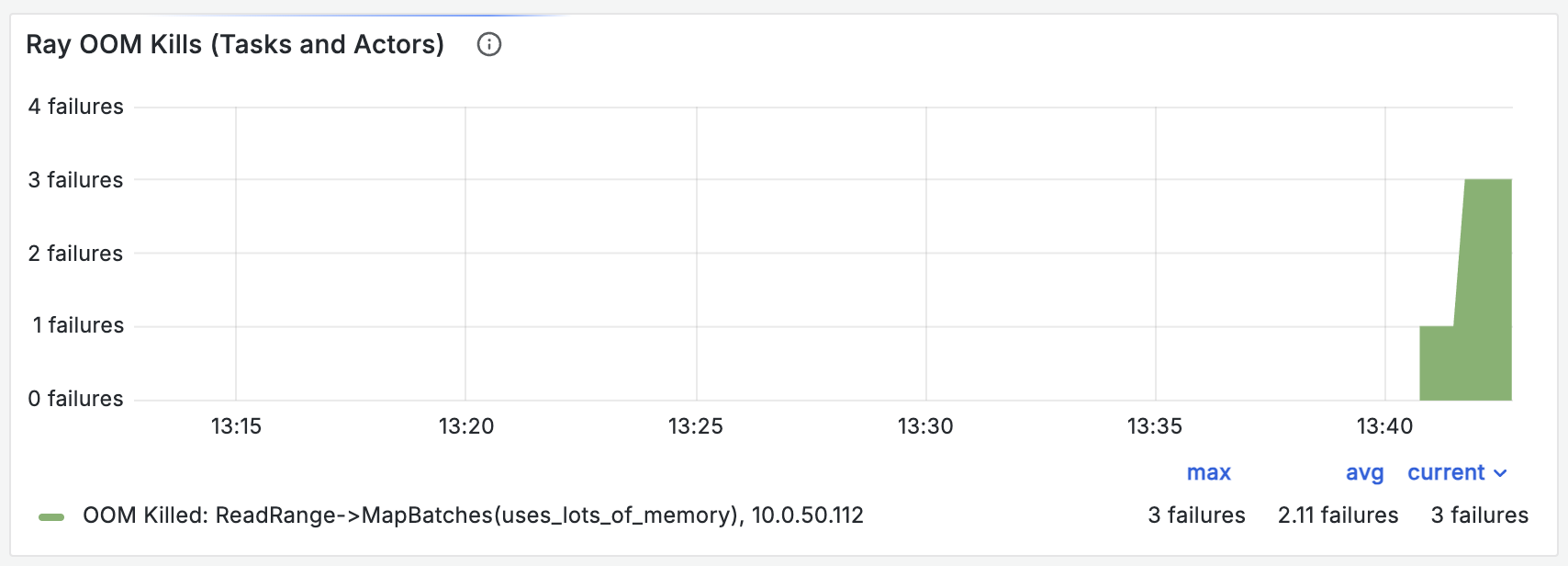
The “Ray OOM Kills (Tasks and Actors)” chart in the Ray Core dashboard shows the number of Ray OOM kills.
Kernel OOM kills#
When the kernel OOM killer kills a Ray process before the Ray OOM killer does, you might see an error similar to the following:
(raylet) Task _map_task failed. There are infinite retries remaining, so the task will be retried. Error:
(raylet) A worker died or was killed while executing a task by an unexpected system error. To troubleshoot the problem, check the logs for the dead worker. Lease ID: 2100000005000000ffffffffffffffffffffffffffffffffffffffffffffffff Worker ID: 863d8a6a594d60f8d143462b96cd3bf4270eafe617aaf2d2ca7266cb Node ID: 4cb25bc084aeb5a31ca5402ad589ae042a71165a8e2dd8418fecee26 Worker IP address: 10.0.50.112 Worker port: 10015 Worker PID: 2938 Worker exit type: SYSTEM_ERROR Worker exit detail: Worker unexpectedly exits with a connection error code 2. End of file. Some common causes include: (1) the process was killed by the OOM killer due to high memory usage, (2) ray stop --force was called, or (3) the worker crashed unexpectedly due to SIGSEGV or another unexpected error.
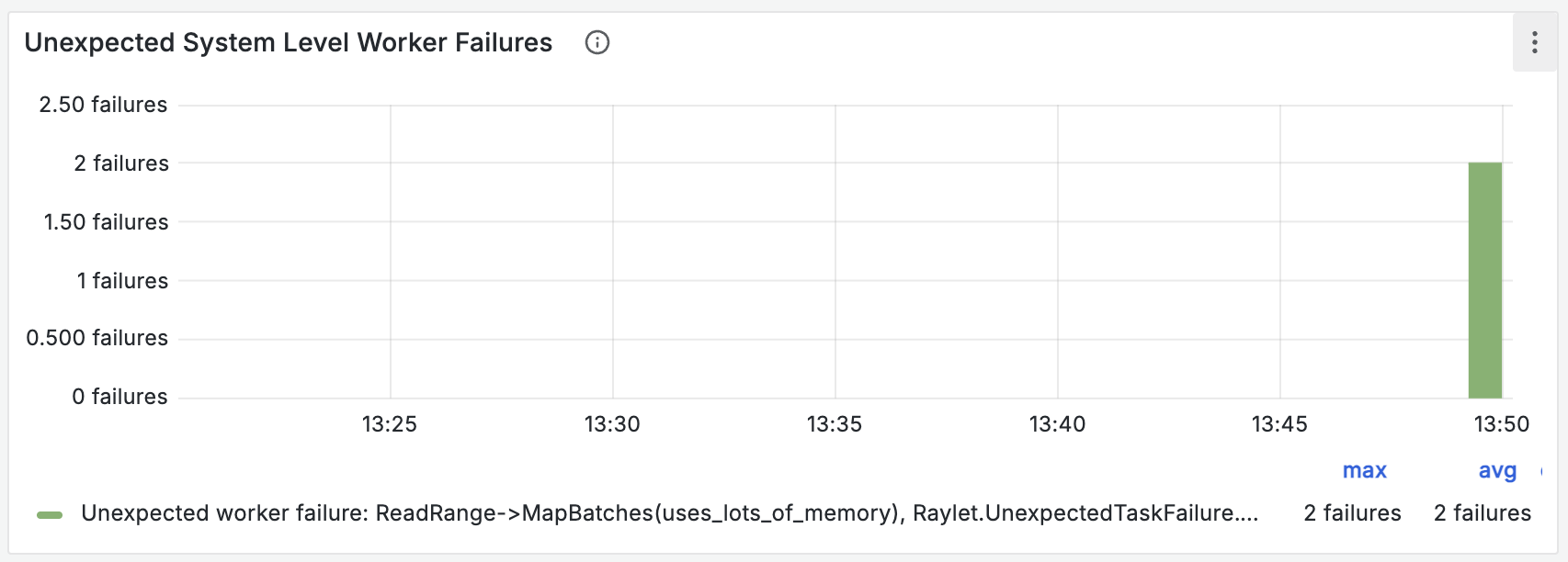
The “Unexpected System Level Worker Failures” chart in the Ray Core dashboard shows the number of unexpected worker deaths. Kernel OOM kills often cause unexpected worker deaths.
Node death#
Without resource isolation, nodes can die under memory pressure. You might see an error similar to the following:
{"asctime":"2026-03-23 18:24:28,943","levelname":"E","message":":info_message: Attempting to recover 41 lost objects by resubmitting their tasks or setting a new primary location from existing copies. To disable object reconstruction, set @ray.remote(max_retries=0).","filename":"core_worker.cc","lineno":475}
You can see node deaths in the “Node Count” chart in the Ray Core dashboard.
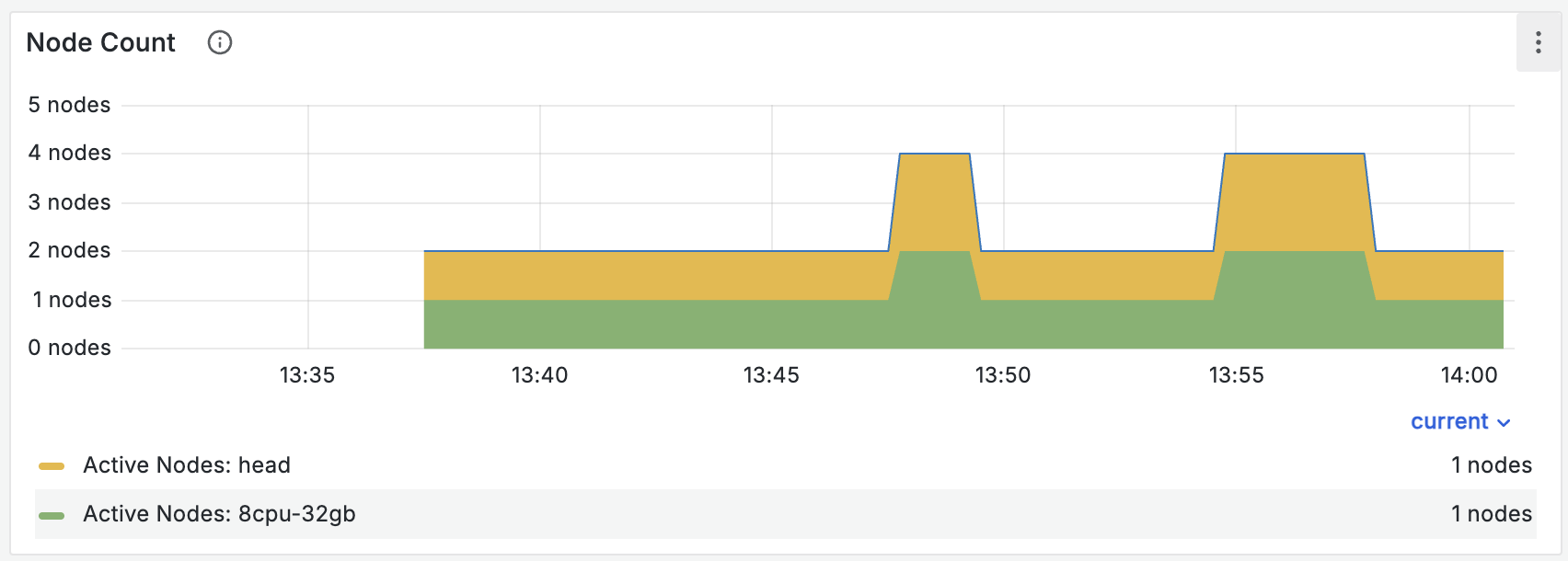
Nodes can die for reasons unrelated to memory pressure. If you see node deaths along with other memory-related errors, memory pressure might have caused them.
Apply best practices to avoid OOMs#
The following practices reduce the risk of OOMs.
Use batch_size="auto" or small batch sizes#
Choose the smallest batch size that achieves good performance. If your UDF doesn’t use GPUs, you can use batch_size="auto" instead.
Added in version 2.56: batch_size="auto"
If your UDF runs on CPU and isn’t vectorized, use map instead. If it’s vectorized, use a batch size of about 16 MiB as a rule of thumb. CPUs have limited ability to parallelize work, so unlike GPUs, they don’t benefit from large batches.
If your UDF runs on GPU, size batches to use about 1/4 of the GPU memory as a rule of thumb. Large GPU batches increase the risk of both GPU OOMs and heap OOMs, because Ray Data builds each batch in heap memory first.
Configure memory for reads and high-memory UDFs#
If a task or actor uses more than a few GiB of memory, set memory to tell Ray Data how much memory each task or actor needs, so that Ray Data doesn’t launch too many at once.
To pick a value for memory, find the max value in the max_uss_bytes field of the Ray Data log file. Ray typically writes this log file to /tmp/ray/session-latest/ray-data/ray-data.log. Set memory to 1.25 times that value, which keeps the observed maximum worker heap usage at 80% of the requested memory and leaves a 20% buffer.
ReadRange->MapBatches(uses_lots_of_memory): {'average_num_outputs_per_task': 1.0, ..., 'max_uss_bytes': {'num_samples': 20, 'mean': 4393336422.4, 'variance': 26855731156.89417, 'min': 4393119744, 'max': 4393529344, 'p50': 4393418752.0, 'p90': 4393500672.0, 'p95': 4393529344.0, 'p99': 4393529344.0}, ...}
Ray Data also writes this information to stdout:
Operator 'ReadRange->MapBatches(uses_lots_of_memory)' uses 4.1GiB of
memory per task on average, but Ray only requests 0.0B per task at the
start of the pipeline.

To avoid out-of-memory errors, consider setting `memory=4.1GiB` in the
appropriate function or method call. (This might be unnecessary if the
number of concurrent tasks is low.)

To change the frequency of this warning, set
`DataContext.get_current().issue_detectors_config.high_memory_detector_config.detection_time_interval_s`,
or disable the warning by setting value to -1. (current value: 30)
Enable default map memory#
Unless you specify a value, Ray Data assumes a UDF needs 0 memory. Even if you set memory correctly for some APIs, Ray Data can still oversubscribe tasks and actors for the APIs where you didn’t.
To avoid oversubscription, set DataContext.get_current().default_map_logical_memory_enabled = True.
Added in version 2.56: DataContext.default_map_logical_memory_enabled
Start Ray with resource isolation#
If you see kernel OOM kills or node deaths from memory pressure, enable resource isolation. Resource isolation protects critical system components from memory pressure. With enough system memory reserved, as the next section describes, you shouldn’t see kernel OOMs or node deaths.
To enable resource isolation, see Resource isolation with cgroup v2.
Added in version 2.56: The full implementation of resource isolation.
Configure system memory to cover the raylet and anything outside the container#
By default, Ray reserves 10% of physical memory for system use. “System” covers Ray processes that aren’t worker tasks or actors, the OS itself, and anything else on the node that isn’t Ray, including processes outside the container.
If you run large non-Ray processes such as Vector, or you still see kernel OOMs with resource isolation enabled, your system processes are likely using more memory than Ray reserves for them by default.
If Ray detects that system processes use more memory than the reserved amount, it logs a message similar to the following:
System slice memory usage 10869600256 bytes has exceeded the reserved system memory of 10737418240 bytes. This can prevent Ray from being able to provide the proper protection to critical system processes and can lead to node deaths and significant loss of progress. Please consider passing a system reserved memory value that is higher than the current system slice memory usage via the --system-reserved-memory flag when starting the raylet.
In this case, reserve more system memory by passing a value in bytes to the ray start flag --system-reserved-memory. Try to leave a buffer of at least 1 GiB, depending on the host size, between the reported or expected system slice memory usage and the reserved system memory.
The default is usually fine unless you use small nodes, such as an m5.xlarge.
Isolate reads for large files#
Ray Data uses PyArrow to implement APIs such as read_parquet. PyArrow can allocate large amounts of memory that isn’t reclaimed when the read tasks finish. Because Ray reuses workers across operators, a downstream operator can schedule tasks onto a worker that still holds that allocation. As a result, downstream operators can appear to use far more memory than they do.
If you see this behavior, try setting DataContext.get_current().isolate_read_workers = True. This flag stops Ray Data from scheduling downstream operators on the same workers as reads, which can improve memory safety at the cost of some performance.
Added in version 2.56: DataContext.isolate_read_workers
Don’t increase RAY_DEFAULT_OBJECT_STORE_MEMORY_PROPORTION#
Ray Data versions before 2.56 emit a warning that suggests increasing RAY_DEFAULT_OBJECT_STORE_MEMORY_PROPORTION. Increasing it can improve performance for some workloads, such as shuffles, but it can also increase the risk of OOMs because it decreases the memory available to your UDFs.
To improve memory safety, don’t set this variable.
What should you expect after tuning?#
If you do all of the following, you shouldn’t see OOMs or node deaths:
Start Ray with resource isolation enabled.
Set system memory large enough to cover everything used outside of Ray worker tasks and actors.
Set logical memory to physical memory minus system memory minus object store memory.
Set
memoryfor each API to at least 125% of its maximum observed heap memory.
The main limitation of these configurations is performance. When you set memory based on maximum observed heap memory use, Ray Data might launch fewer tasks or actors than it could otherwise run, which can decrease throughput.
To experiment with oversubscription at the risk of OOMs, decrease memory.
Further reading#
To learn more about how Ray handles memory, see the following guides: