Environments#
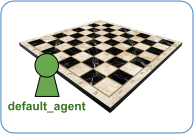
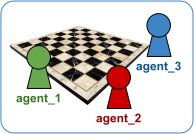
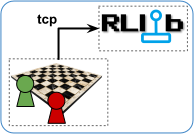

In online reinforcement learning (RL), an algorithm trains a policy neural network by collecting data on the fly from an RL environment or simulator. The agent navigates the environment, choosing actions governed by this policy and collecting the environment’s observations and rewards. The algorithm trains the policy on the collected data so that the policy’s action choices eventually maximize the cumulative reward over the agent’s lifetime.
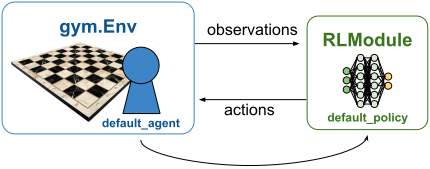
Single-agent setup: One agent lives in the environment and takes actions computed by a single policy. The mapping from agent to policy is fixed. “default_agent” maps to “default_policy”. See Multi-Agent Environments for how this setup generalizes in the multi-agent case.#
Farama Gymnasium#
RLlib relies on Farama’s Gymnasium API as its main RL environment interface for single-agent training. For multi-agent training, see Multi-Agent Environments. To implement custom logic with gymnasium and integrate it into an RLlib config, see this SimpleCorridor example.
Tip
Not all action spaces are compatible with all RLlib algorithms. See the algorithm overview for details. In particular, check which algorithms support discrete action spaces, continuous action spaces, or both.
For more details on building a custom Farama Gymnasium environment, see the gymnasium.Env class definition.
For multi-agent training, see RLlib’s multi-agent API and supported third-party APIs.
Configuring environments#
To specify which RL environment to train against, provide either a string name or a Python class that subclasses gymnasium.Env.
Specifying by string#
RLlib interprets string values as registered gymnasium environment names by default.
For example:
from ray.rllib.algorithms.ppo import PPOConfig

config = (
    PPOConfig()
    # Configure the RL environment to use as a string (by name), which
    # is registered with Farama's gymnasium.
    .environment("Acrobot-v1")
)
algo = config.build()
print(algo.train())
Tip
For all supported environment names registered with Farama, see these resources by environment category:
Specifying by subclass of gymnasium.Env#
If you’re using a custom subclass of the gymnasium.Env class, pass the class itself rather than a registered string. Your subclass must accept a single config argument in its constructor, which can default to None.
For example:
import gymnasium as gym
import numpy as np
from ray.rllib.algorithms.ppo import PPOConfig

class MyDummyEnv(gym.Env):
    # Write the constructor and provide a single `config` arg,
    # which may be set to None by default.
    def __init__(self, config=None):
        # As per gymnasium standard, provide observation and action spaces in your
        # constructor.
        self.observation_space = gym.spaces.Box(-1.0, 1.0, (1,), np.float32)
        self.action_space = gym.spaces.Discrete(2)

    def reset(self, seed=None, options=None):
        # Return (reset) observation and info dict.
        return np.array([1.0]), {}

    def step(self, action):
        # Return next observation, reward, terminated, truncated, and info dict.
        return np.array([1.0]), 1.0, False, False, {}

config = (
    PPOConfig()
    .environment(
        MyDummyEnv,
        env_config={},  # `config` to pass to your env class
    )
)
algo = config.build()
print(algo.train())
Specifying by Tune-registered lambda#
A third option for providing environment information to your config is to register an environment creator function or lambda with Ray Tune. The creator function must take a single config parameter and return a single non-vectorized gymnasium.Env instance.
For example:
from ray.tune.registry import register_env

def env_creator(config):
    return MyDummyEnv(config)  # Return a gymnasium.Env instance.

register_env("my_env", env_creator)
config = (
    PPOConfig()
    .environment("my_env")  # <- Tune registered string pointing to your custom env creator.
)
algo = config.build()
print(algo.train())
For a complete example using a custom environment, see the custom_gym_env.py example script.
Warning
Because Ray is distributed, gymnasium’s own registry is incompatible with Ray. Always use the registration method documented here so that remote Ray actors can access your custom environments.
In the preceding example, the env_creator function takes a config argument. This config is primarily a dictionary that contains required settings. You can also access additional properties on the config variable. For example, use config.worker_index to get the remote EnvRunner index or config.num_workers for the total number of EnvRunners in use. This approach helps you customize environments within an ensemble so that environments on some EnvRunners behave differently from those on other EnvRunners.
For example:
class EnvDependingOnWorkerAndVectorIndex(gym.Env):
    def __init__(self, config):
        # Pick actual env based on worker and env indexes.
        self.env = gym.make(
            choose_env_for(config.worker_index, config.vector_index)
        )
        self.action_space = self.env.action_space
        self.observation_space = self.env.observation_space

    def reset(self, seed, options):
        return self.env.reset(seed, options)

    def step(self, action):
        return self.env.step(action)

register_env("multi_env", lambda config: MultiEnv(config))
Tip
When you use logging within an environment, configure it inside the environment, which runs within Ray workers. Ray ignores any logging configuration set before Ray starts. Use the following code to connect to Ray’s logging instance:
import logging
logger = logging.getLogger("ray.rllib")
Performance and scaling#
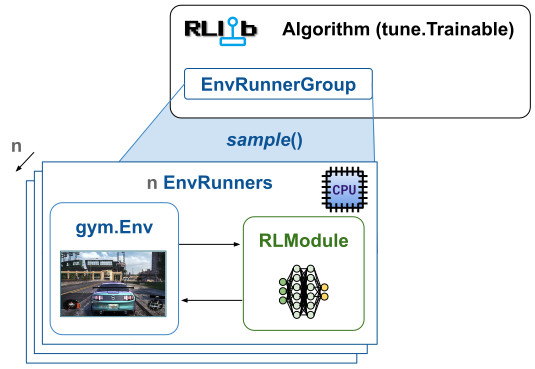
EnvRunner with gym.Env setup: Environments in RLlib live within the EnvRunner actors. Scale their
number n through the config.env_runners(num_env_runners=...) setting. Each EnvRunner actor
can hold more than one vectorized gymnasium environment. Set the number
of individual environment copies per EnvRunner through config.env_runners(num_envs_per_env_runner=...).#
There are two methods to scale sample collection with RLlib and gymnasium environments, and you can combine both:
Distribute across multiple processes: RLlib creates multiple
EnvRunnerinstances, each a Ray actor, for experience collection, controlled through yourAlgorithmConfig:config.env_runners(num_env_runners=...).Vectorization within a single process: Many environments achieve high frame rates per core, but policy inference latency limits them. To address this limitation, create multiple environments per process to batch the policy forward pass across these vectorized environments. Set
config.env_runners(num_envs_per_env_runner=...)to create more than one environment copy perEnvRunneractor. You can also run the individual sub-environments within a vector as separate processes, using the Python multiprocessing that gymnasium provides. Setconfig.env_runners(remote_worker_envs=True)to create individual subenvironments as separate processes and step them in parallel.
Note
Multi-agent setups aren’t vectorizable yet. The Ray team is working on a solution for this restriction by using the gymnasium >= 1.x custom vectorization feature.
Tip
See the scaling guide for more on RLlib training at scale.
Expensive environments#
Some environments might require substantial resources to initialize and run. If your environments require more than 1 CPU per EnvRunner, provide more resources for each actor by setting the following config options: config.env_runners(num_cpus_per_env_runner=..., num_gpus_per_env_runner=...)