Using Ray for highly parallelizable tasks#

Ray can run complex parallel workloads, but many workloads are simple: run the same function many times on independent inputs. For example, suppose you have 100,000 time series to process with the same algorithm, and each one takes a minute. On a single processor, that takes about 70 days. With 8 processors on one machine, it takes about 9 days. With 8 machines of 16 cores each, it takes about 13 hours.
This example shows how to use Ray for this kind of workload by estimating pi. The algorithm draws random x and y values between 0 and 1 and counts how many points fall inside the unit circle, where x*x + y*y <= 1. The fraction of points inside the circle approaches pi/4.
The following code assumes you’ve already set up a Ray cluster and are running on its head node. To set up a Ray cluster, see Ray Clusters Getting Started.
import ray
import random
import time
import math
from fractions import Fraction
# Connect to the running Ray cluster.
ray.init(address='auto')
Start with a plain Python function that runs sample_count experiments and returns the fraction of points that land inside the circle.
def pi4_sample(sample_count):
    """pi4_sample runs sample_count experiments, and returns the
    fraction of time it was inside the circle.
    """
    in_count = 0
    for i in range(sample_count):
        x = random.random()
        y = random.random()
        if x*x + y*y <= 1:
            in_count += 1
    return Fraction(in_count, sample_count)
Wrap the function with ray.remote to create a Ray task. A task is like a function, except that it returns its result asynchronously. A task also might not run on the local machine. Ray can schedule it anywhere in the cluster, so you can run more tasks in parallel than the processors on a single machine allow.
You can also apply @ray.remote as a decorator. This example keeps the plain function so that it can run the same code without Ray for comparison.
remote_pi4_sample = ray.remote(pi4_sample)
Calling .remote() returns an object ref right away instead of the result. To get the result, call ray.get(), which blocks until the task finishes. The following cell times a single task that draws one million samples:
SAMPLE_COUNT = 1000 * 1000
start = time.time()
future = remote_pi4_sample.remote(sample_count = SAMPLE_COUNT)
pi4 = ray.get(future)
end = time.time()
dur = end - start
print(f'Running {SAMPLE_COUNT} tests took {dur} seconds')
Running 1000000 tests took 0.06528210639953613 seconds
Next, check how close the estimate is to pi.
pi = pi4 * 4
float(pi)
3.138212
abs(pi-math.pi)/pi
0.0010772546882726014
One million samples gets only the first few decimal places right. To improve the estimate, draw more samples.
Before you run the full workload, measure what Ray gains over a sequential baseline. A sequential run of the full workload takes a long time, so the comparison uses a subset: 1,000 batches of one million samples each, one billion samples in total. The following cell runs the subset in a plain Python loop on a single core:
SUBSET_BATCHES = 1000
start = time.time()
sequential_output = [pi4_sample(sample_count=SAMPLE_COUNT) for _ in range(SUBSET_BATCHES)]
sequential_dur = time.time() - start
print(f'Sequential: {SUBSET_BATCHES} batches took {sequential_dur:.1f} seconds')
Sequential: 1000 batches took 56.0 seconds
The following cell runs the same subset as Ray tasks. Ray runs as many of them in parallel as the cluster has CPUs:
start = time.time()
ray_output = ray.get([remote_pi4_sample.remote(sample_count=SAMPLE_COUNT) for _ in range(SUBSET_BATCHES)])
ray_dur = time.time() - start
print(f'Ray: {SUBSET_BATCHES} batches took {ray_dur:.1f} seconds')
print(f'Speedup over the sequential loop: {sequential_dur / ray_dur:.1f}x')
Ray: 1000 batches took 7.1 seconds
Speedup over the sequential loop: 7.9x
On the 12-core machine that produced the outputs on this page, the Ray tasks finished the subset about 8 times faster than the sequential loop. The speedup depends on how many CPUs your cluster has, so expect a different number on your cluster.
Now run the full workload: 100 billion samples, 100,000 times the single task in the preceding cells.
FULL_SAMPLE_COUNT = 100 * 1000 * 1000 * 1000  # 100 billion samples.
BATCHES = int(FULL_SAMPLE_COUNT / SAMPLE_COUNT)
print(f'Doing {BATCHES} batches')
start = time.time()
results = []
for _ in range(BATCHES):
    results.append(remote_pi4_sample.remote(sample_count=SAMPLE_COUNT))
output = ray.get(results)
full_dur = time.time() - start
print(f'Running {BATCHES} batches took {full_dur:.1f} seconds')
Doing 100000 batches
Running 100000 batches took 1109.8 seconds
The loop submits all 100,000 tasks and collects their object refs without waiting for any task to finish. ray.get then blocks until every task completes. How long that takes depends on the size of your cluster. On the same 12-core machine, the full run took about 18 minutes. The full workload is 100 times the subset, so running it sequentially takes about 100 times as long as the sequential subset.
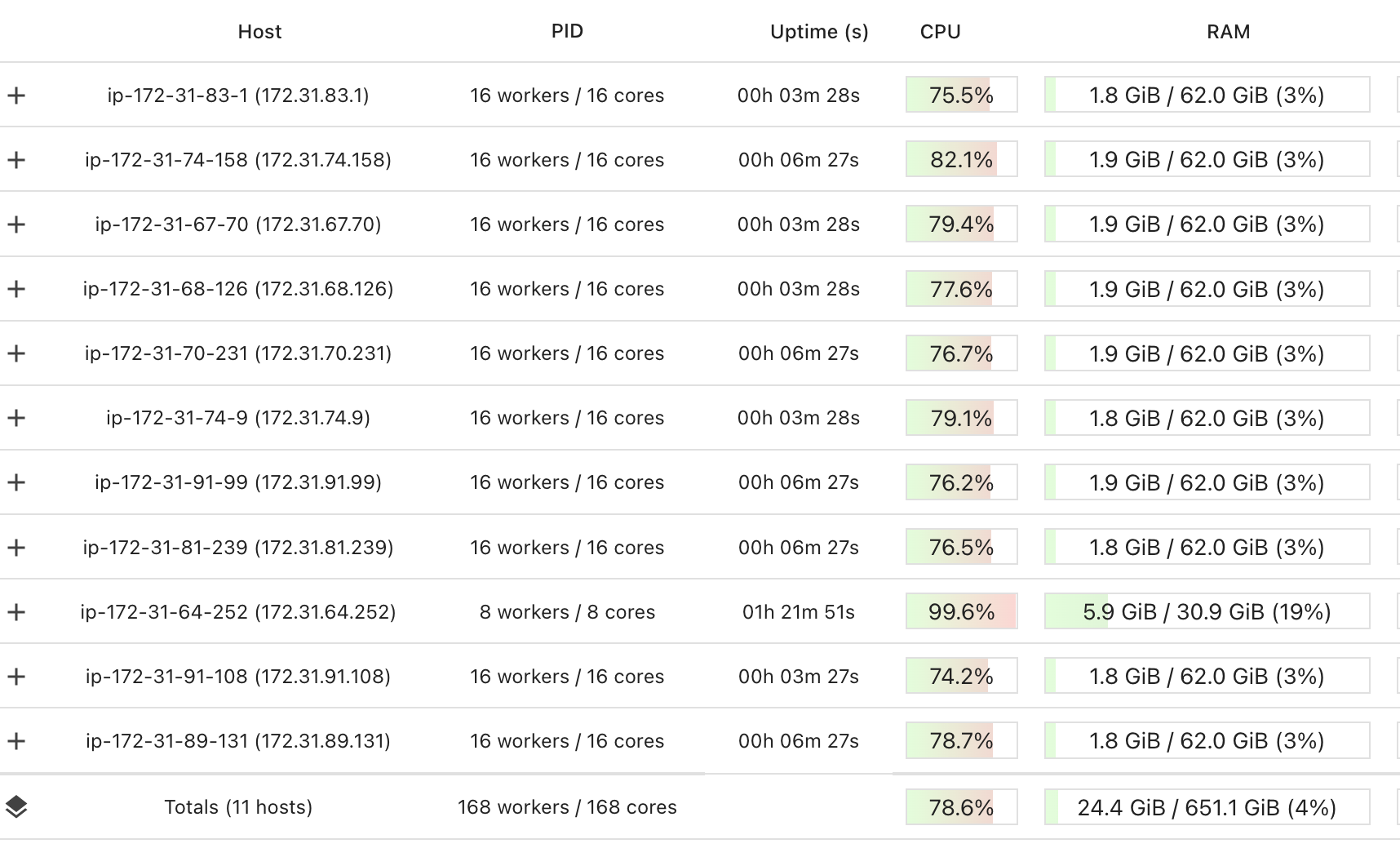
The following Ray dashboard view comes from a run of the full workload on a cluster of 11 nodes with 168 CPU cores in total. CPU utilization across the cluster is about 79%.
pi = sum(output)*4/len(output)
float(pi)
3.14159122456
abs(pi-math.pi)/pi
4.548745177263842e-07
With 100 billion samples, the relative error drops to roughly one in a million.