Callbacks#
Callbacks are the most straightforward way to inject code into experiments. You can define the code to execute at certain events and pass it to your AlgorithmConfig.
The following example defines a lambda that prints an episode’s return after the episode terminates:
from ray.rllib.algorithms.ppo import PPOConfig

ppo = config = (
    PPOConfig()
    .environment("CartPole-v1")
    .callbacks(
        on_episode_end=(
            lambda episode, **kw: print(f"Episode done. R={episode.get_return()}")
        )
    )
    .build()
)
ppo.train()
Callback lambdas versus stateful RLlibCallback#
You can define custom code for callback events in two ways.
Callback lambdas#
If the injected code is simple and doesn’t need to store temporary information for reuse in later event calls, use a lambda and pass it to the callbacks() method as shown earlier.
See Callback events for the complete list. The event names always match the argument names for the callbacks() method.
Stateful RLlibCallback#
If the injected code is stateful and temporarily stores results for reuse in later calls triggered by the same or a different event, subclass the RLlibCallback API and implement one or more methods, such as on_algorithm_init().
The following example prints a terminated episode’s return, but uses a subclass of RLlibCallback.
from ray.rllib.algorithms.ppo import PPOConfig
from ray.rllib.callbacks.callbacks import RLlibCallback

class EpisodeReturn(RLlibCallback):
    def __init__(self):
        super().__init__()
        # Keep some global state in between individual callback events.
        self.overall_sum_of_rewards = 0.0

    def on_episode_end(self, *, episode, **kwargs):
        self.overall_sum_of_rewards += episode.get_return()
        print(f"Episode done. R={episode.get_return()} Global SUM={self.overall_sum_of_rewards}")

ppo = (
    PPOConfig()
    .environment("CartPole-v1")
    .callbacks(EpisodeReturn)
    .build()
)
ppo.train()
Callback events#
During a training iteration, the Algorithm normally walks through the following event tree, a high-level overview of the events RLlib’s callback system supports:
Algorithm
    .__init__()
        `on_algorithm_init` - After algorithm construction and setup.
    .train()
        `on_train_result` - After a training iteration.
    .evaluate()
        `on_evaluate_start` - Before evaluation starts using the eval `EnvRunnerGroup`.
        `on_evaluate_end` - After evaluation is finished.
    .restore_from_path()
        `on_checkpoint_loaded` - After a checkpoint's new state has been loaded.

EnvRunner
    .__init__()
        `on_environment_created` - After the RL environment has been created.
    .sample()
        `on_episode_created` - After a new episode object has been created.
        `on_episode_start` - After an episode object has started (after `env.reset()`).
        `on_episode_step` - After an episode object has stepped (after `env.step()`).
        `on_episode_end` - After an episode object has terminated (or truncated).
        `on_sample_end` - At the end of the `EnvRunner.sample()` call.
Some of the events in the tree happen simultaneously, on different processes through Ray actors. For example, an EnvRunner actor might trigger its on_episode_start event while another EnvRunner actor triggers its on_sample_end event and the main Algorithm process triggers on_train_result.
Note
RLlib only invokes callbacks in Algorithm and EnvRunner actors. The Ray team is considering expanding callbacks onto Learner actors and possibly RLModule instances.
Algorithm-bound methods of RLlibCallback
EnvRunner-bound methods of RLlibCallback
Chaining callbacks#
You can define more than one RLlibCallback class and send them in a list to the callbacks() method. You can also send lists of callables, instead of a single callable, to the different arguments of that method.
For example, you might already have a subclass of RLlibCallback that you want to reuse across experiments. One experiment requires debug callback code, so you inject it only temporarily for a few runs.
Resolution order of chained callbacks#
RLlib resolves all available callback methods and callables for a given event in a fixed order.
Subclasses of RLlibCallback take precedence over individual callables or lists of callables that you provide through the arguments of the callbacks() method.
For example, assume the callback event is on_train_result, which fires at the end of a training iteration and inside the algorithm’s process:
RLlib loops through all given
RLlibCallbacksubclasses and calls theiron_train_resultmethod, keeping the exact order you provided in the list.RLlib then loops through all defined
on_train_resultcallables. You configured these by calling thecallbacks()method and defining theon_train_resultargument in this call.
class MyCallbacks(RLlibCallback):
    def on_train_result(self, *, algorithm, metrics_logger, result, **kwargs):
        print("RLlibCallback subclass")

class MyDebugCallbacks(RLlibCallback):
    def on_train_result(self, *, algorithm, metrics_logger, result, **kwargs):
        print("debug subclass")

# Define the callbacks order through the config.
# Subclasses first, then individual `on_train_result` (or other events) callables:
config.callbacks(
    callbacks_class=[MyDebugCallbacks, MyCallbacks],  # <- note: debug class first
    on_train_result=[
        lambda algorithm, **kw: print('lambda 1'),
        lambda algorithm, **kw: print('lambda 2'),
    ],
)

# When training the algorithm, after each training iteration, you should see
# something like:
# > debug subclass
# > RLlibCallback subclass
# > lambda 1
# > lambda 2
Examples#
The following two examples show how to set up custom callbacks on the Algorithm process and on the EnvRunner processes.
Example 1: on_train_result#
The following example implements a custom function that writes the replay buffer contents to disk periodically.
You normally don’t want to write buffer contents along with your Algorithm checkpoints, so writing them less often and in a more controlled way through a custom callback can be a good compromise.
import ormsgpack
from ray.rllib.algorithms.dqn import DQNConfig

def _write_buffer_if_necessary(algorithm, metrics_logger, result):
    # Write the buffer contents only every ith iteration.
    if algorithm.training_iteration % 2 == 0:
        # python dict
        buffer_contents = algorithm.local_replay_buffer.get_state()

        # binary
        msgpacked = ormsgpack.packb(
           buffer_contents,
           option=ormsgpack.OPT_SERIALIZE_NUMPY,
        )

        # Open some file and write the buffer contents into it using `ormsgpack`.
        with open("replay_buffer_contents.msgpack", "wb") as f:
           f.write(msgpacked)

config = (
    DQNConfig()
    .environment("CartPole-v1")
    .callbacks(
       on_train_result=_write_buffer_if_necessary,
    )
)
dqn = config.build()

# Train n times. Expect RLlib to write buffer every ith iteration.
for _ in range(2):
    print(dqn.train())
See Callbacks invoked in Algorithm for the exact call signatures of all available callbacks and the argument types they expect.
Example 2: on_episode_step and on_episode_end#
The following example implements a custom RLlibCallback class that computes the average “first-joint angle” of the Acrobot-v1 RL environment:
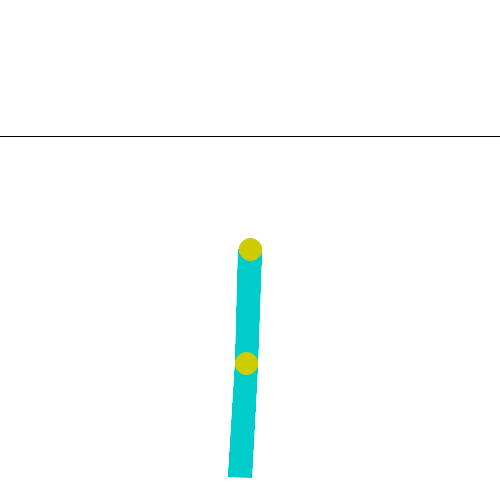
The Acrobot-v1 environment: The env code describes the angle you are about to compute and log through your custom callback as:#
`theta1` is the angle of the first joint, where an angle of 0.0 indicates that the first
link is pointing directly downwards.
This example uses RLlib’s MetricsLogger API to log the custom computations of the injected code. See MetricsLogger API for more details about the MetricsLogger API.
For a more complex example, see one that generates and logs a PacMan heatmap image to WandB.
import math
import numpy as np
from ray.rllib.algorithms.ppo import PPOConfig
from ray.rllib.callbacks.callbacks import RLlibCallback

class LogAcrobotAngle(RLlibCallback):
    def on_episode_created(self, *, episode, **kwargs):
        # Initialize an empty list in the `custom_data` property of `episode`.
        episode.custom_data["theta1"] = []

    def on_episode_step(self, *, episode, env, **kwargs):
        # First get the angle from the env (note that `env` is a VectorEnv).
        # See https://github.com/Farama-Foundation/Gymnasium/blob/main/gymnasium/envs/classic_control/acrobot.py
        # for the env source code.
        cos_theta1, sin_theta1 = env.envs[0].unwrapped.state[0], env.envs[0].unwrapped.state[1]
        # Convert cos/sin/tan into degree.
        deg_theta1 = math.degrees(math.atan2(sin_theta1, cos_theta1))

        # Log the theta1 degree value in the episode object, temporarily.
        episode.custom_data["theta1"].append(deg_theta1)

    def on_episode_end(self, *, episode, metrics_logger, **kwargs):
        # Get all the logged theta1 degree values and average them.
        theta1s = episode.custom_data["theta1"]
        avg_theta1 = np.mean(theta1s)

        # Log the final result - per episode - to the MetricsLogger.
        # Report with a sliding/smoothing window of 50.
        metrics_logger.log_value("theta1_mean", avg_theta1, reduce="mean", window=50)

config = (
    PPOConfig()
    .environment("Acrobot-v1")
    .callbacks(
        callbacks_class=LogAcrobotAngle,
    )
)
ppo = config.build()

# Train n times. Expect to find `theta1_mean` in the results under:
# `env_runners/theta1_mean`
for i in range(2):
    results = ppo.train()
    print(
        f"iter={i} "
        f"theta1_mean={results['env_runners']['theta1_mean']} "
        f"R={results['env_runners']['episode_return_mean']}"
    )
Tip
You can base your custom logic on whether the calling EnvRunner is a regular “training” EnvRunner, used to collect training samples, or an evaluation EnvRunner, used to play through episodes for evaluation only. Access the env_runner.config.in_evaluation boolean flag, which is True on evaluation EnvRunner actors and False on EnvRunner actors used to collect training data.
See Callbacks invoked in Algorithm for the exact call signatures of all available callbacks and the argument types they expect.