Anti-pattern: Fetching too many objects at once with ray.get causes failure#
Avoid calling ray.get() on too many objects, because this can lead to a heap out-of-memory or object store out-of-space failure. Instead, fetch and process one batch at a time.
If you have many tasks that you want to run in parallel, calling ray.get() on all of them at once could fail with a heap out-of-memory or object store out-of-space error, because Ray needs to fetch all the objects to the caller at the same time. Instead, get and process the results one batch at a time. After you process a batch, Ray evicts the objects in that batch to make space for later batches.
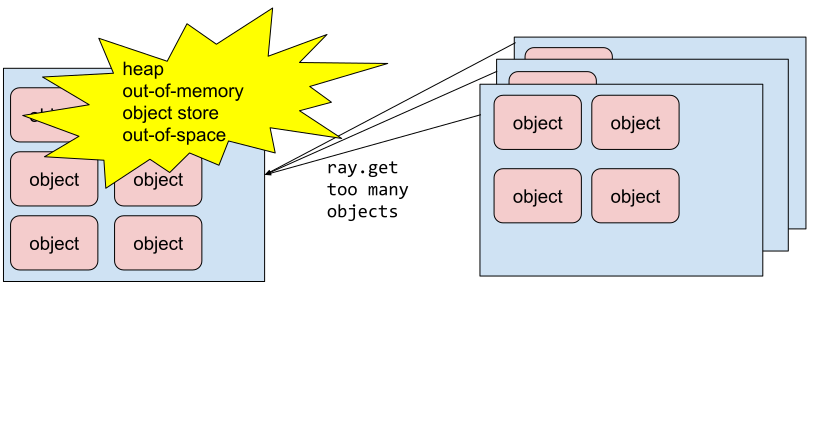
Fetching too many objects at once with ray.get()#
Code example#
Anti-pattern:
import ray
import numpy as np

ray.init()


def process_results(results):
    # custom process logic
    pass


@ray.remote
def return_big_object():
    return np.zeros(1024 * 10)


NUM_TASKS = 1000

object_refs = [return_big_object.remote() for _ in range(NUM_TASKS)]
# This will fail with heap out-of-memory
# or object store out-of-space if NUM_TASKS is large enough.
results = ray.get(object_refs)
process_results(results)
Better approach:
BATCH_SIZE = 100

while object_refs:
    # Process results in the finish order instead of the submission order.
    ready_object_refs, object_refs = ray.wait(object_refs, num_returns=BATCH_SIZE)
    # The node only needs enough space to store
    # a batch of objects instead of all objects.
    results = ray.get(ready_object_refs)
    process_results(results)
Besides getting one batch at a time to avoid failure, this example also uses ray.wait() to reduce the runtime by processing results in the order they finish instead of the order you submitted them. For more details, see Anti-pattern: Processing results in submission order using ray.get increases runtime.