Advanced Python APIs#
Custom training workflows#
In the basic training example, Tune calls train() on your algorithm once per training iteration and reports the new training results. Sometimes you want full control over training while still running inside Tune. Tune supports custom trainable functions to implement custom training workflows.
Curriculum learning#
In curriculum learning, you set the environment to different difficulties throughout training. With this setting, the algorithm learns to solve the final problem incrementally by interacting with and exploring increasingly difficult phases. Normally, such a curriculum starts with an easy level and transitions toward a harder difficulty as training progresses. For another curriculum learning example, see the Reverse Curriculum Generation for Reinforcement Learning Agents blog post.
With RLlib’s Algorithm and custom callbacks APIs, you can implement any curriculum. This example script introduces the basic concepts.
First, define some env options. This example uses the FrozenLake-v1 environment, a grid world, whose map you can fully customize. RLlib represents three tasks of different env difficulties with slightly different maps that the agent has to navigate.
ENV_OPTIONS = {
    "is_slippery": False,
    # Limit the number of steps the agent is allowed to make in the env to
    # make it almost impossible to learn without the curriculum.
    "max_episode_steps": 16,
}

# Our 3 tasks: 0=easiest, 1=medium, 2=hard
ENV_MAPS = [
    # 0
    [
        "SFFHFFFH",
        "FFFHFFFF",
        "FFGFFFFF",
        "FFFFFFFF",
        "HFFFFFFF",
        "HHFFFFHF",
        "FFFFFHHF",
        "FHFFFFFF",
    ],
    # 1
    [
        "SFFHFFFH",
        "FFFHFFFF",
        "FFFFFFFF",
        "FFFFFFFF",
        "HFFFFFFF",
        "HHFFGFHF",
        "FFFFFHHF",
        "FHFFFFFF",
    ],
    # 2
    [
        "SFFHFFFH",
        "FFFHFFFF",
        "FFFFFFFF",
        "FFFFFFFF",
        "HFFFFFFF",
        "HHFFFFHF",
        "FFFFFHHF",
        "FHFFFFFG",
    ],
]
Then define the central piece that controls the curriculum. This is a custom callbacks class that overrides on_train_result().
import ray
from ray import tune
from ray.rllib.callbacks.callbacks import RLlibCallback

class MyCallbacks(RLlibCallback):
    def on_train_result(self, algorithm, result, **kwargs):
        if result["env_runners"]["episode_return_mean"] > 200:
            task = 2
        elif result["env_runners"]["episode_return_mean"] > 100:
            task = 1
        else:
            task = 0
        algorithm.env_runner_group.foreach_worker(
            lambda ev: ev.foreach_env(
                lambda env: env.set_task(task)))

ray.init()
tune.Tuner(
    "PPO",
    param_space={
        "env": YourEnv,
        "callbacks": MyCallbacks,
    },
).fit()
Global coordination#
Sometimes you need to coordinate between pieces of code that live in different processes managed by RLlib. For example, you might maintain a global average of a variable, or centrally control a hyperparameter that policies use. Ray provides a general way to achieve this coordination through named actors. See Ray actors. RLlib assigns these actors a global name. You can retrieve handles to them using these names. As an example, maintain a shared global counter that environments increment and the driver program reads periodically:
import ray


@ray.remote
class Counter:
    def __init__(self):
        self.count = 0

    def inc(self, n):
        self.count += n

    def get(self):
        return self.count


# on the driver
counter = Counter.options(name="global_counter").remote()
print(ray.get(counter.get.remote()))  # get the latest count

# in your envs
counter = ray.get_actor("global_counter")
counter.inc.remote(1)  # async call to increment the global count
Ray actors provide high performance. For more complex cases, use them to implement communication patterns such as parameter servers and all-reduce.
Visualizing custom metrics#
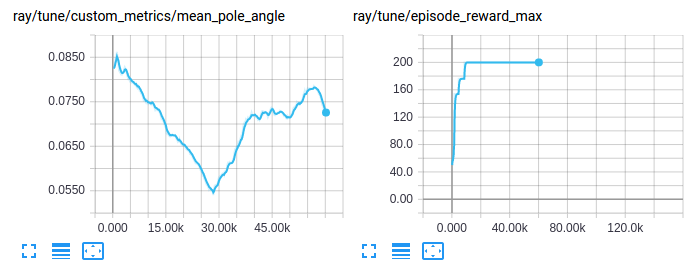
Access and visualize custom metrics as you do any other training result:
Customizing exploration behavior#
RLlib offers a unified top-level API to configure and customize an agent’s exploration behavior, including how and whether to sample actions from distributions, stochastically or deterministically. Set up the behavior with built-in Exploration classes from this package. You specify and configure them inside AlgorithmConfig().env_runners(..). You can also sub-class any of these built-ins, add custom behavior, and use that new class in the config instead.
Every policy has an Exploration object, which RLlib creates from the AlgorithmConfig’s .env_runners(exploration_config=...) method. The method specifies the class through the special type key and constructor arguments through all other keys. For example:
from ray.rllib.algorithms.algorithm_config import AlgorithmConfig

config = AlgorithmConfig().env_runners(
    exploration_config={
        # Special `type` key provides class information
        "type": "StochasticSampling",
        # Add any needed constructor args here.
        "constructor_arg": "value",
    }
)
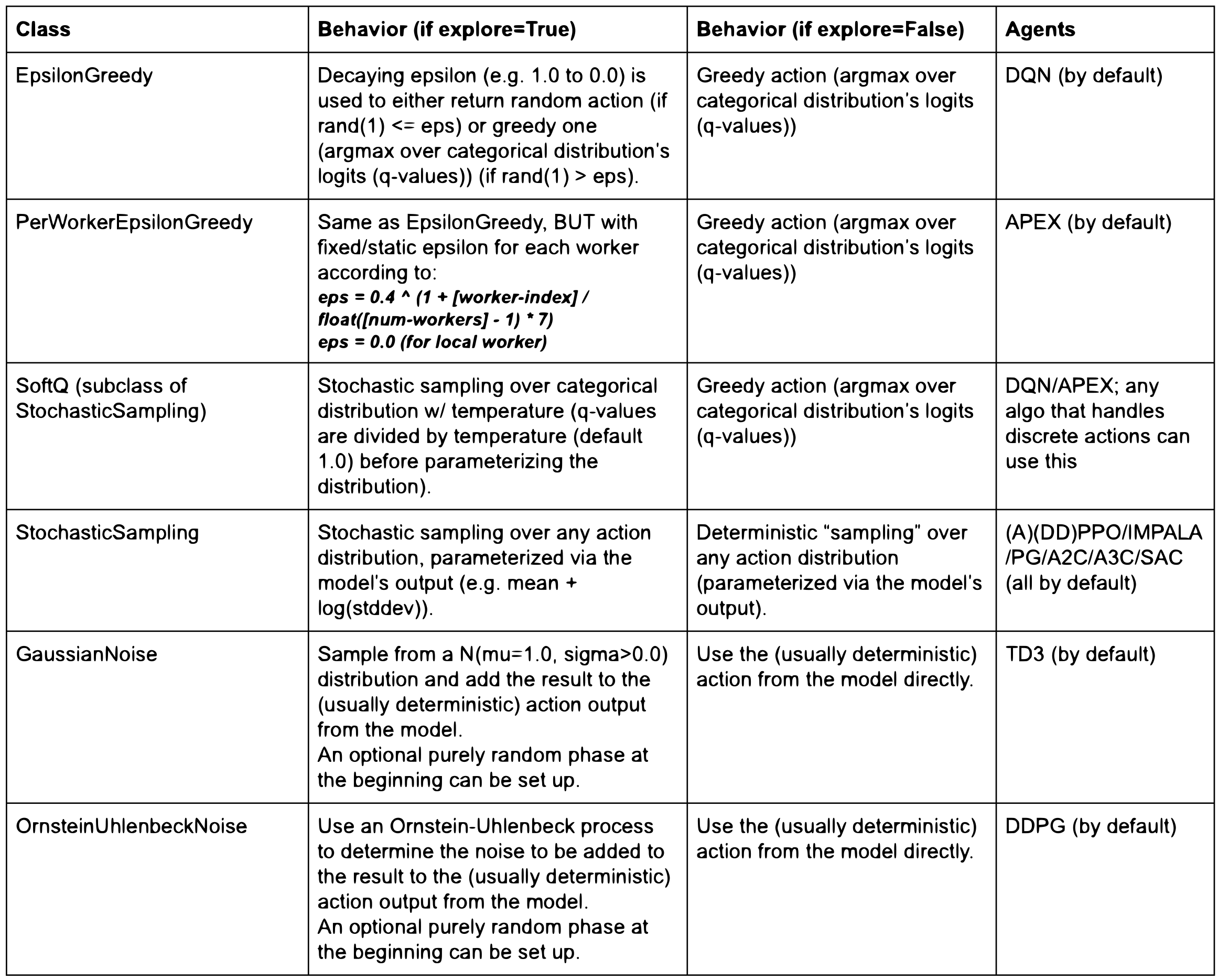
The following table lists all built-in Exploration sub-classes and the agents that use them by default:
An Exploration class implements the get_exploration_action method, where you define the exact exploratory behavior. It takes the model’s output, the action distribution class, the model itself, a timestep such as the global env-sampling steps already taken, and an explore switch. It outputs a tuple of the action and the log-likelihood:
    def get_exploration_action(self,
                               *,
                               action_distribution: ActionDistribution,
                               timestep: Union[TensorType, int],
                               explore: bool = True
                               ) -> Tuple[TensorType, TensorType]:
        """Returns a (possibly) exploratory action and its log-likelihood.

        Given the Model's logits outputs and action distribution, returns an
        exploratory action.

        Args:
            action_distribution: The instantiated
                ActionDistribution object to work with when creating
                exploration actions.
            timestep: The current sampling time step. It can be a tensor
                for TF graph mode, otherwise an integer.
            explore: True: "Normal" exploration behavior.
                False: Suppress all exploratory behavior and return
                a deterministic action.

        Returns:
            A tuple consisting of 1) the chosen exploration action or a
            tf-op to fetch the exploration action from the graph and
            2) the log-likelihood of the exploration action.
        """
        pass
At the highest level, the Algorithm.compute_actions and Policy.compute_actions methods have a boolean explore switch, which RLlib passes into Exploration.get_exploration_action. If explore=None, RLlib uses the value of Algorithm.config["explore"], which serves as the main switch for exploratory behavior. For example, you can turn off all exploration for evaluation. See Customized evaluation during training.
The following excerpts from rllib/algorithms/algorithm.py set up different exploration behaviors for different Algorithms:
# All of the following configs go into Algorithm.config.

# 1) Switching *off* exploration by default.
# Behavior: Calling `compute_action(s)` without explicitly setting its `explore`
# param results in no exploration.
# However, explicitly calling `compute_action(s)` with `explore=True`
# still(!) results in exploration (per-call overrides default).
"explore": False,

# 2) Switching *on* exploration by default.
# Behavior: Calling `compute_action(s)` without explicitly setting its
# explore param results in exploration.
# However, explicitly calling `compute_action(s)` with `explore=False`
# results in no(!) exploration (per-call overrides default).
"explore": True,

# 3) Example exploration_config usages:
# a) DQN: see rllib/algorithms/dqn/dqn.py
"explore": True,
"exploration_config": {
   # Exploration sub-class by name or full path to module+class
   # (e.g., "ray.rllib.utils.exploration.epsilon_greedy.EpsilonGreedy")
   "type": "EpsilonGreedy",
   # Parameters for the Exploration class' constructor:
   "initial_epsilon": 1.0,
   "final_epsilon": 0.02,
   "epsilon_timesteps": 10000,  # Timesteps over which to anneal epsilon.
},

# b) DQN Soft-Q: In order to switch to Soft-Q exploration, do instead:
"explore": True,
"exploration_config": {
   "type": "SoftQ",
   # Parameters for the Exploration class' constructor:
   "temperature": 1.0,
},

# c) All policy-gradient algos and SAC: see rllib/algorithms/algorithm.py
# Behavior: The algo samples stochastically from the
# model-parameterized distribution. This is the global Algorithm default
# setting defined in algorithm.py and used by all PG-type algos (plus SAC).
"explore": True,
"exploration_config": {
   "type": "StochasticSampling",
   "random_timesteps": 0,  # timesteps at beginning, over which to act uniformly randomly
},
Customized evaluation during training#
RLlib reports online training rewards, but sometimes you want to compute rewards with different settings, such as with exploration turned off or on a specific set of environment configurations. To evaluate policies during Algorithm.train(), set the evaluation_interval to a positive integer. This value specifies how many Algorithm.train() calls occur each time RLlib runs an “evaluation step”:
from ray.rllib.algorithms.algorithm_config import AlgorithmConfig

# Run one evaluation step on every 3rd `Algorithm.train()` call.
config = AlgorithmConfig().evaluation(
    evaluation_interval=3,
)
An evaluation step uses its own EnvRunner instances and runs for evaluation_duration episodes or time-steps. The evaluation_duration_unit setting determines the unit and takes either "episodes", the default, or "timesteps".
# Every time we run an evaluation step, run it for exactly 10 episodes.
config = AlgorithmConfig().evaluation(
    evaluation_duration=10,
    evaluation_duration_unit="episodes",
)
# Every time we run an evaluation step, run it for (close to) 200 timesteps.
config = AlgorithmConfig().evaluation(
    evaluation_duration=200,
    evaluation_duration_unit="timesteps",
)
When you use evaluation_duration_unit=timesteps and evaluation_duration isn’t divisible by the number of evaluation workers, RLlib rounds the number of time-steps up to the nearest whole number that’s divisible by the number of evaluation workers. When you use evaluation_duration_unit=episodes and evaluation_duration isn’t divisible by the number of evaluation workers, RLlib runs the remaining episodes on the first n evaluation EnvRunners and leaves the other workers idle for that time. You can configure evaluation workers with evaluation_num_env_runners.
For example:
# Every time we run an evaluation step, run it for exactly 10 episodes, no matter,
# how many eval workers we have.
config = AlgorithmConfig().evaluation(
    evaluation_duration=10,
    evaluation_duration_unit="episodes",
    # What if number of eval workers is non-dividable by 10?
    # -> Run 7 episodes (1 per eval worker), then run 3 more episodes only using
    #    evaluation workers 1-3 (evaluation workers 4-7 remain idle during that time).
    evaluation_num_env_runners=7,
)
Before each evaluation step, RLlib synchronizes weights from the main model to all evaluation workers.
By default, RLlib runs the evaluation step, provided one exists in the current iteration, immediately after the respective training step. For example, for evaluation_interval=1, the sequence of events is: train(0->1), eval(1), train(1->2), eval(2), train(2->3), .... The indices show the version of neural network weights RLlib uses. train(0->1) is an update step that changes the weights from version 0 to version 1, and eval(1) then uses weights version 1. Weights index 0 represents the randomly initialized weights of the neural network.
The following is another example. For evaluation_interval=2, the sequence is: train(0->1), train(1->2), eval(2), train(2->3), train(3->4), eval(4), ....
Instead of running train and eval steps in sequence, you can also run them in parallel with the evaluation_parallel_to_training=True config setting. In this case, RLlib runs both training and evaluation steps at the same time using multi-threading. This parallelization can speed up the evaluation process significantly, but leads to a 1-iteration delay between reported training and evaluation results. The evaluation results are behind in this case because they use slightly outdated model weights, which RLlib synchronizes after the previous training step.
For example, for evaluation_parallel_to_training=True and evaluation_interval=1, the sequence is: train(0->1) + eval(0), train(1->2) + eval(1), train(2->3) + eval(2), where + connects phases happening at the same time. The weights indices change with respect to the non-parallel examples. The evaluation weights indices are now “one behind” the resulting train weights indices (train(1->**2**) + eval(**1**)).
When running with the evaluation_parallel_to_training=True setting, RLlib supports a special “auto” value for evaluation_duration. Use this auto setting to make the evaluation step take roughly as long as the concurrent training step:
# Run evaluation and training at the same time via threading and make sure they roughly
# take the same time, such that the next `Algorithm.train()` call can execute
# immediately and not have to wait for a still ongoing (e.g. b/c of very long episodes)
# evaluation step:
config = AlgorithmConfig().evaluation(
    evaluation_interval=2,
    # run evaluation and training in parallel
    evaluation_parallel_to_training=True,
    # automatically end evaluation when train step has finished
    evaluation_duration="auto",
    evaluation_duration_unit="timesteps",  # <- this setting is ignored; RLlib
    # will always run by timesteps (not by complete
    # episodes) in this duration=auto mode
)
Use the evaluation_config key to override any config settings for the evaluation workers. For example, to switch off exploration in the evaluation steps, do the following:
# Switching off exploration behavior for evaluation workers
# (see rllib/algorithms/algorithm.py). Use any keys in this sub-dict that are
# also supported in the main Algorithm config.
config = AlgorithmConfig().evaluation(
    evaluation_config=AlgorithmConfig.overrides(explore=False),
)
# ... which is a more type-checked version of the old-style:
# config = AlgorithmConfig().evaluation(
#    evaluation_config={"explore": False},
# )
Note
Policy gradient algorithms can find the optimal policy, even if it’s stochastic. Setting explore=False prevents the evaluation workers from using this stochastic policy.
The evaluation_num_env_runners setting determines the level of parallelism within the evaluation step. Set it to a larger value to run more evaluation episodes or time-steps in parallel. For example, if evaluation_duration=10, evaluation_duration_unit=episodes, and evaluation_num_env_runners=10, each evaluation EnvRunner runs only one episode in each evaluation step.
If you observe occasional failures in the evaluation EnvRunners during evaluation, for example an environment that sometimes crashes or stalls, use the following settings to minimize the negative effects of that behavior:
With or without parallel evaluation, RLlib respects all fault tolerance settings, such as ignore_env_runner_failures or restart_failed_env_runners, and applies them to the failed evaluation workers.
The following is an example:
# Having an environment that occasionally blocks completely for e.g. 10min would
# also affect (and block) training. Here is how you can defend your evaluation setup
# against oft-crashing or -stalling envs (or other unstable components on your evaluation
# workers).
config = AlgorithmConfig().evaluation(
    evaluation_interval=1,
    evaluation_parallel_to_training=True,
    evaluation_duration="auto",
    evaluation_duration_unit="timesteps",  # <- default anyway
    evaluation_force_reset_envs_before_iteration=True,  # <- default anyway
)
This example runs all evaluation EnvRunners in parallel, so that if one worker takes too long to run through an episode and return data, or fails entirely, the other evaluation EnvRunners still complete the job.
To fully customize the evaluation step, set custom_eval_function in the config to a callable. This callable takes the Algorithm object and an EnvRunnerGroup object, the Algorithm’s self.evaluation_workers EnvRunnerGroup instance, and returns a metrics dictionary. See algorithm.py for further documentation.
This end-to-end example shows how to set up a custom online evaluation in custom_evaluation.py. To evaluate your policy only at the end of training, set evaluation_interval: [int], where [int] is the number of training iterations before stopping.
The following examples show how RLlib reports the custom evaluation metrics, nested under the evaluation key of normal training results:
------------------------------------------------------------------------
Sample output for `python custom_evaluation.py --no-custom-eval`
------------------------------------------------------------------------

INFO algorithm.py:623 -- Evaluating current policy for 10 episodes.
INFO algorithm.py:650 -- Running round 0 of parallel evaluation (2/10 episodes)
INFO algorithm.py:650 -- Running round 1 of parallel evaluation (4/10 episodes)
INFO algorithm.py:650 -- Running round 2 of parallel evaluation (6/10 episodes)
INFO algorithm.py:650 -- Running round 3 of parallel evaluation (8/10 episodes)
INFO algorithm.py:650 -- Running round 4 of parallel evaluation (10/10 episodes)

Result for PG_SimpleCorridor_2c6b27dc:
  ...
  evaluation:
    env_runners:
      custom_metrics: {}
      episode_len_mean: 15.864661654135338
      episode_return_max: 1.0
      episode_return_mean: 0.49624060150375937
      episode_return_min: 0.0
      episodes_this_iter: 133
------------------------------------------------------------------------
Sample output for `python custom_evaluation.py`
------------------------------------------------------------------------

INFO algorithm.py:631 -- Running custom eval function <function ...>
Update corridor length to 4
Update corridor length to 7
Custom evaluation round 1
Custom evaluation round 2
Custom evaluation round 3
Custom evaluation round 4

Result for PG_SimpleCorridor_0de4e686:
  ...
  evaluation:
    env_runners:
      custom_metrics: {}
      episode_len_mean: 9.15695067264574
      episode_return_max: 1.0
      episode_return_mean: 0.9596412556053812
      episode_return_min: 0.0
      episodes_this_iter: 223
      foo: 1
Rewriting trajectories#
In the on_postprocess_traj callback, you have full access to the trajectory batch post_batch and other training state. You can use this information to rewrite the trajectory. Rewriting the trajectory has two uses:
Backdating rewards to previous time steps, for example, based on values in
info.Adding model-based curiosity bonuses to rewards. You can train the model with a custom model supervised loss.
To access the policy or model policy.model in the callbacks, info['pre_batch'] returns a tuple where the first element is the policy and the second is the batch itself. You can also access all the rollout worker state with the following call:
from ray.rllib.evaluation.rollout_worker import get_global_worker

# You can use this call from any callback to get a reference to the
# RolloutWorker running in the process. The RolloutWorker has references to
# all the policies, etc. See rollout_worker.py for more info.
rollout_worker = get_global_worker()
RLlib defines policy losses over the post_batch data, so you can mutate it in the callbacks to change what data the policy loss function sees.