Install RLlib for development#
Develop RLlib locally without compiling Ray by using the setup-dev.py script. The script sets up symlinks between the ray/rllib directory in your local git clone and the matching directory bundled with the pip-installed ray package. Every change you make in your clone’s source files then appears immediately in your installed ray.
If you installed Ray from source using these instructions, don’t use the script. Those steps should already have created the necessary symlinks.
When you use the setup-dev.py script, keep your git branch in sync with the installed Ray binaries. Stay up to date on master and install the latest wheel.
# Clone your fork onto your local machine, e.g.:
git clone https://github.com/[your username]/ray.git
cd ray
# Link only RLlib. This leads to the most stable behavior and you won't have to re-install Ray as often.
python python/ray/setup-dev.py --allow rllib
# If you anticipate making changes to Tune or Train often, link them too:
# python python/ray/setup-dev.py --allow rllib tune train
Contributing to RLlib#
Contributing fixes and enhancements#
File new RLlib-related PRs through Ray’s GitHub repo. The RLlib team welcomes external help from the open-source community. If you’re unsure how to structure a bug-fix or enhancement PR, create a small PR first, then ask questions in its conversation section. For an example of a good first community PR, see this pull request.
Contributing algorithms#
These guidelines cover merging new algorithms into RLlib. RLlib accepts contributions at two levels. The first is an example script, possibly with additional classes in other files. The second is a fully integrated RLlib algorithm in rllib/algorithms.
An example algorithm has three requirements:
It must subclass
Algorithmand implement thetraining_step()method.It must include the main example script, which demonstrates the algorithm, in a CI test that proves the algorithm learns a task.
It should provide capabilities that existing algorithms don’t have.
A fully integrated algorithm has four additional requirements:
It must provide substantial new capabilities that you can’t add to existing algorithms.
It should support custom RLModules.
It should use RLlib abstractions and support distributed execution.
It should include at least one tuned hyperparameter example. The CI tests this example.
Both integrated and contributed algorithms ship with the ray PyPI package, and Ray’s automated tests cover them.
New features#
The GitHub issues page tracks new feature development, discussions, and priorities. It might not include every development effort.
API stability#
API decorators in the codebase#
Objects and methods annotated with @PublicAPI or @DeveloperAPI on the new API stack, or @OldAPIStack on the old API stack, have the API compatibility guarantees that each decorator’s reference describes:
Benchmarks#
The rl-experiments repo holds many training-run results, and examples/algorithms lists working hyperparameter configurations sorted by algorithm. Benchmark results help the community. If you have results that might interest others, open a pull request to either repo.
Debugging RLlib#
Finding memory leaks in workers#
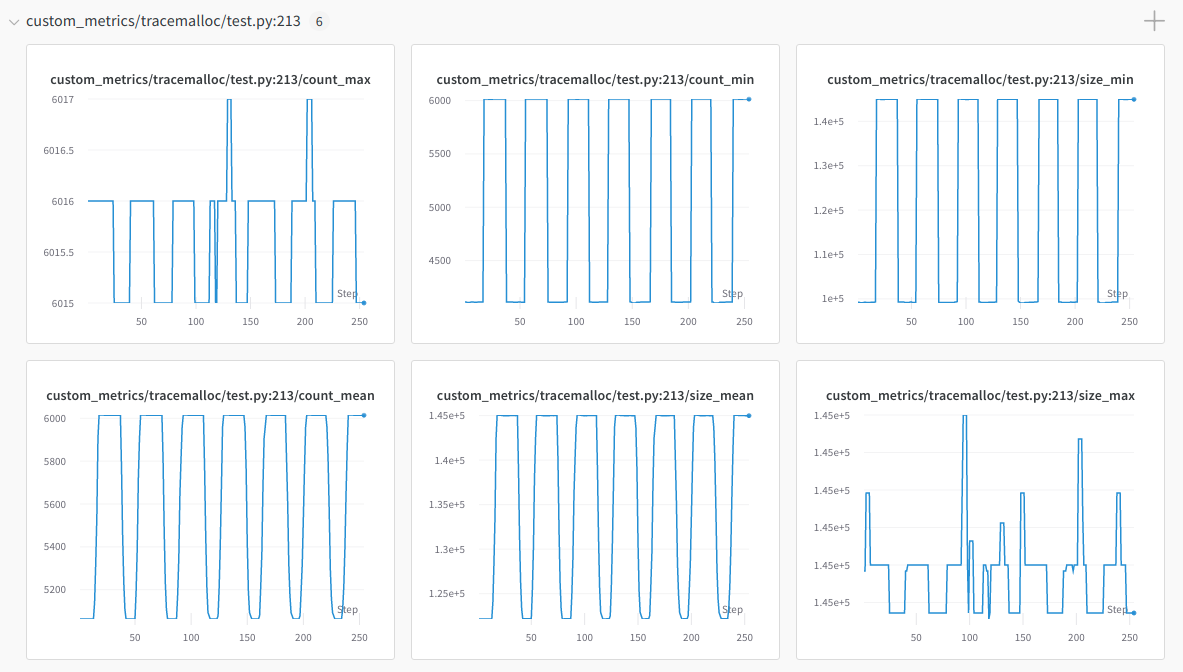
Keeping the memory usage of long-running workers stable can be challenging. Use the MemoryTrackingCallbacks class to track worker memory usage.
The callback adds the 20 objects with the highest memory usage in the workers as custom metrics. Monitor these with TensorBoard or other metrics integrations such as Weights & Biases:
Troubleshooting#
If you encounter errors such as blas_thread_init: pthread_create: Resource temporarily unavailable when using many workers, set OMP_NUM_THREADS=1. For other resource-limit errors, check the configured system limits with ulimit -a.
To debug unexpected hangs or performance problems, run ray stack to dump the stack traces of all Ray workers on the current node, ray timeline to dump a timeline visualization of tasks to a file, and ray memory to list all object references in the cluster.