Tips for first-time users#
This page describes four tips that can help you avoid common mistakes that can significantly hurt the performance of your first Ray programs. For an in-depth treatment of advanced design patterns, see core design patterns.
API |
Description |
|---|---|
|
Initialize the Ray context. |
|
Function or class decorator specifying that the function runs |
|
Postfix to every remote function, remote class declaration, or |
|
Store an object in the object store and return its object ref. |
|
Return an object or list of objects from the object ref |
|
From a list of object refs, return |
All the results on this page come from runs on a 13-inch MacBook Pro with a 2.7 GHz Core i7 CPU and 16 GB of RAM. ray.init() automatically detects the number of cores when it runs on a single machine. To reduce the variability of the results you observe when you run the following code on your machine, the examples set num_cpus=4, which specifies a machine with four CPUs.
Because each task requests one CPU by default, Ray can execute up to four tasks in parallel with this setting. As a result, the Ray system consists of one driver executing the program and up to four workers running remote tasks or actors.
Tip 1: Delay ray.get()#
With Ray, the invocation of every remote operation, such as a task or an actor method, is asynchronous. The operation immediately returns a promise or future, which is essentially an object ref that identifies the operation’s result. Asynchronous invocation is key to achieving parallelism, because the driver program can launch multiple operations in parallel. To get the results, call ray.get() on their object refs. This call blocks until the results are available. As a side effect, it also blocks the driver program from invoking other operations, which can hurt parallelism.
When you’re new to Ray, it’s natural to use ray.get() inadvertently. To illustrate this point, consider the following Python code, which calls the do_some_work() function four times. Each invocation takes around 1 second:
import ray
import time

def do_some_work(x):
    time.sleep(1) # Replace this with work you need to do.
    return x

start = time.time()
results = [do_some_work(x) for x in range(4)]
print("duration =", time.time() - start)
print("results =", results)
As expected, the program takes around 4 seconds:
duration = 4.0149290561676025
results = [0, 1, 2, 3]
To parallelize the preceding program with Ray, some first-time users make the function remote:
import time
import ray

ray.init(num_cpus=4) # Specify this system has 4 CPUs.

@ray.remote
def do_some_work(x):
    time.sleep(1) # Replace this with work you need to do.
    return x

start = time.time()
results = [do_some_work.remote(x) for x in range(4)]
print("duration =", time.time() - start)
print("results =", results)
However, running the preceding program produces the following output:
duration = 0.0003619194030761719
results = [ObjectRef(df5a1a828c9685d3ffffffff0100000001000000), ObjectRef(cb230a572350ff44ffffffff0100000001000000), ObjectRef(7bbd90284b71e599ffffffff0100000001000000), ObjectRef(bd37d2621480fc7dffffffff0100000001000000)]
Two things stand out in this output. First, the program finishes immediately, in less than 1 ms. Second, instead of the expected results, [0, 1, 2, 3], you get a list of object refs. Recall that remote operations are asynchronous and return futures, which are object refs, instead of the results themselves. The program measures only the time it takes to invoke the tasks, not their running times, and it gets the object refs of the results for the four tasks.
To get the results, call ray.get(). The first instinct is to call ray.get() on each remote operation invocation by replacing line 12 with the following:
results = [ray.get(do_some_work.remote(x)) for x in range(4)]
Re-running the program after this change produces the following output:
duration = 4.018050909042358
results =  [0, 1, 2, 3]
The results are correct, but the program still takes 4 seconds, so there’s no speedup. What’s going on? ray.get() is blocking, so calling it after each remote operation means that the program waits for that operation to complete. In effect, the program executes one operation at a time, so there’s no parallelism.
To run the tasks in parallel, call ray.get() after invoking all of them. In this example, replace line 12 with the following:
results = ray.get([do_some_work.remote(x) for x in range(4)])
After this change, the program produces the following output:
duration = 1.0064549446105957
results =  [0, 1, 2, 3]
The Ray program now runs in 1 second, which means that all invocations of do_some_work() run in parallel.
In summary, ray.get() is a blocking operation, so calling it eagerly can hurt parallelism. Write your program to call ray.get() as late as possible.
Tip 2: Avoid tiny tasks#
When you first parallelize your code with Ray, the natural instinct is to make every function or class remote. This can lead to undesirable consequences. If the tasks are tiny, the Ray program can take longer than the equivalent Python program.
Consider the preceding examples again, but this time make each task much shorter, 0.1 ms, and increase the number of task invocations to 100,000.
import time

def tiny_work(x):
    time.sleep(0.0001) # Replace this with work you need to do.
    return x

start = time.time()
results = [tiny_work(x) for x in range(100000)]
print("duration =", time.time() - start)
Running this program produces the following output:
duration = 13.36544418334961
This result is expected. The lower bound for executing 100,000 tasks that take 0.1 ms each is 10 seconds, plus other overheads such as function calls.
Next, parallelize this code with Ray by making every invocation of tiny_work() remote:
import time
import ray

@ray.remote
def tiny_work(x):
    time.sleep(0.0001) # Replace this with work you need to do.
    return x

start = time.time()
result_ids = [tiny_work.remote(x) for x in range(100000)]
results = ray.get(result_ids)
print("duration =", time.time() - start)
Running this code produces the following output:
duration = 27.46447515487671
Ray didn’t improve the execution time. The Ray program is slower than the sequential program. What’s going on? Every task invocation has a non-trivial overhead, such as scheduling, inter-process communication, and updating the system state. This overhead dominates the time it takes to execute the task.
One way to speed up this program is to make the remote tasks larger to amortize the invocation overhead. The following solution aggregates 1000 tiny_work() function calls in a single, bigger remote function:
import time
import ray

def tiny_work(x):
    time.sleep(0.0001) # replace this is with work you need to do
    return x

@ray.remote
def mega_work(start, end):
    return [tiny_work(x) for x in range(start, end)]

start = time.time()
result_ids = []
[result_ids.append(mega_work.remote(x*1000, (x+1)*1000)) for x in range(100)]
results = ray.get(result_ids)
print("duration =", time.time() - start)
Running the preceding program produces the following output:
duration = 3.2539820671081543
This duration is approximately one fourth of the sequential execution time, in line with expectations, because Ray can run four tasks in parallel. The natural question is how large a task needs to be to amortize the remote invocation overhead. One way to find out is to run the following program, which estimates the per-task invocation overhead:
@ray.remote
def no_work(x):
    return x

start = time.time()
num_calls = 1000
[ray.get(no_work.remote(x)) for x in range(num_calls)]
print("per task overhead (ms) =", (time.time() - start)*1000/num_calls)
Running the preceding program on a 2018 MacBook Pro produces the following output:
per task overhead (ms) = 0.4739549160003662
In other words, it takes almost half a millisecond to execute an empty task. This result suggests that a task needs to take at least a few milliseconds to amortize the invocation overhead. One caveat is that the per-task overhead varies from machine to machine, and between tasks that run on the same machine and tasks that run remotely. Even so, making sure that tasks take at least a few milliseconds is a good rule of thumb when you develop Ray programs.
Tip 3: Avoid passing same object repeatedly to remote tasks#
When you pass a large object as an argument to a remote function, Ray implicitly calls ray.put() to store that object in the local object store. This behavior can significantly improve the performance of a remote task invocation when the remote task runs locally, because all local tasks share the object store.
However, in some cases, automatically calling ray.put() on a task invocation leads to performance issues. One example is passing the same large object as an argument repeatedly, as the following program shows:
import time
import numpy as np
import ray

@ray.remote
def no_work(a):
    return

start = time.time()
a = np.zeros((5000, 5000))
result_ids = [no_work.remote(a) for x in range(10)]
results = ray.get(result_ids)
print("duration =", time.time() - start)
This program produces the following output:
duration = 1.0837509632110596
This running time is large for a program that calls only 10 remote tasks that do nothing. The running time is unexpectedly high because each time the program invokes no_work(a), Ray calls ray.put(a), which copies array a to the object store. Because array a has 25 million entries, copying it takes a non-trivial amount of time.
To avoid copying array a every time the program invokes no_work(), explicitly call ray.put(a) and then pass the object ref for a to no_work(), as the following program shows:
import time
import numpy as np
import ray

ray.init(num_cpus=4)

@ray.remote
def no_work(a):
    return

start = time.time()
a_id = ray.put(np.zeros((5000, 5000)))
result_ids = [no_work.remote(a_id) for x in range(10)]
results = ray.get(result_ids)
print("duration =", time.time() - start)
Running this program produces the following output:
duration = 0.132796049118042
This program is about 8 times faster than the original program. That’s expected, because the main overhead of invoking no_work(a) was copying array a to the object store, which now happens only once.
Arguably, a more important advantage of avoiding multiple copies of the same object in the object store is that it keeps the object store from filling up prematurely and incurring the cost of object eviction.
Tip 4: Pipeline data processing#
If you call ray.get() on the results of multiple tasks, you have to wait until the last of these tasks finishes. This wait can be an issue if tasks take widely different amounts of time.
To illustrate this issue, consider the following example, which runs four do_some_work() tasks in parallel. Each task takes a time uniformly distributed between 0 and 4 seconds. Next, assume that process_results() processes the results of these tasks and takes 1 second per result. The expected running time is then the time it takes to execute the slowest of the do_some_work() tasks, plus 4 seconds, which is the time it takes to execute process_results().
import time
import random
import ray

@ray.remote
def do_some_work(x):
    time.sleep(random.uniform(0, 4)) # Replace this with work you need to do.
    return x

def process_results(results):
    sum = 0
    for x in results:
        time.sleep(1) # Replace this with some processing code.
        sum += x
    return sum

start = time.time()
data_list = ray.get([do_some_work.remote(x) for x in range(4)])
sum = process_results(data_list)
print("duration =", time.time() - start, "\nresult = ", sum)
The output of the program shows that it takes close to 8 seconds to run:
duration = 7.82636022567749
result =  6
Waiting for the last task to finish when the other tasks might have finished much earlier unnecessarily increases the program running time. A better solution is to process the data as soon as it becomes available. To do so, call ray.wait() on a list of object refs. Without any other parameters, this function returns as soon as an object in its argument list is ready. The call returns two values. The first is a list containing the object ref of the ready object, and the second is the list containing the object refs of the objects that aren’t ready yet. The following modified program also replaces process_results() with process_incremental(), which processes one result at a time.
import time
import random
import ray

@ray.remote
def do_some_work(x):
    time.sleep(random.uniform(0, 4)) # Replace this with work you need to do.
    return x

def process_incremental(sum, result):
    time.sleep(1) # Replace this with some processing code.
    return sum + result

start = time.time()
result_ids = [do_some_work.remote(x) for x in range(4)]
sum = 0
while len(result_ids):
    done_id, result_ids = ray.wait(result_ids)
    sum = process_incremental(sum, ray.get(done_id[0]))
print("duration =", time.time() - start, "\nresult = ", sum)
This program now takes a bit over 4.8 seconds, a significant improvement:
duration = 4.852453231811523
result =  6
To aid intuition, Figure 1 compares the execution timelines of the two approaches. One uses ray.get() to wait for all results to become available before processing them, and the other uses ray.wait() to start processing the results as soon as they become available.
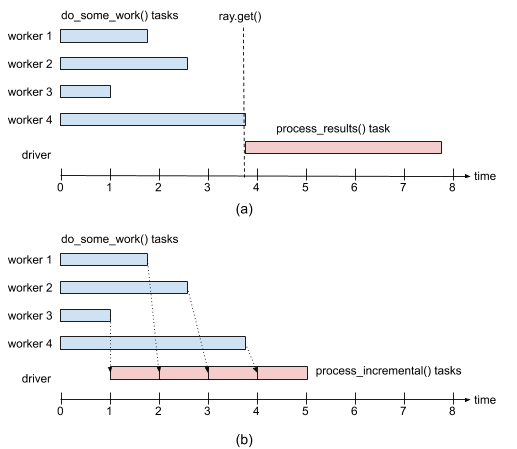
Figure 1: (a) Execution timeline when using ray.get() to wait for all results from do_some_work() tasks before calling process_results(). (b) Execution timeline when using ray.wait() to process results as soon as they become available.#